Issue with PreSigned PDF in WebViewer

Hi Kevin,

Thanks a lot — I can confirm that adding the INCREMENTAL flag to getFileData() solves the issue. We’re now able to extract document data without breaking existing signatures, which unblocks our workflow. Great work!

While I have your attention, I wanted to ask a related question:

In our application, we apply visual styles to AcroForm widgets (e.g., background color and border) using the following function:

await this.instance!.Core.annotationManager.setAnnotationStyles(annotation, {
    backgroundColor: new this.instance!.Core.Annotations.Color(color.background[0], color.background[1], color.background[2], 0.5),
    border: new this.instance!.Core.Annotations.Border({
        width: 1,
        color: new this.instance!.Core.Annotations.Color(color.border[0], color.border[1], color.border[2]),
    }),
});

await this.instance!.Core.annotationManager.redrawAnnotation(annotation);

However, we’ve noticed that applying this styling to form fields already included in a digital signature can also invalidate the signature — even if no other changes are made.

So we have two questions:

  1. Is there a way to detect if a widget or form field is already signed (i.e., part of a digital signature) so that we can skip styling it altogether?
  2. Alternatively, is there a way to temporarily apply a visual style (e.g., background color) at runtime and ensure it doesn’t persist into the saved/downloaded PDF — so that the final document remains unaltered and signatures stay valid?

We want to ensure that visual feedback in the UI doesn’t compromise the document integrity in any way.

Thanks again for your continued support — it’s very much appreciated.

Best regards,
William
1 Like

Hi there,

  1. Is there a way to detect if a widget or form field is already signed (i.e., part of a digital signature) so that we can skip styling it altogether?

If the widget is signed via appearance, you can use isSignedByAppearance API:

If the widget is signed via annotation, you can use the getAssociatedSignatureAnnotation API:

  1. Alternatively, is there a way to temporarily apply a visual style (e.g., background color) at runtime and ensure it doesn’t persist into the saved/downloaded PDF — so that the final document remains unaltered and signatures stay valid?

I haven’t tried this but I would assume applying the style and removing the style before downloading should keep the signature valid. You are effectively only modifying the DOM elements and not the PDF itself when applying styles.

best regards,
Kevin

1 Like

Hi Kevin,

Thanks for your quick response and for the suggestions regarding how to detect if a widget is signed.

I’ve tested the approach you mentioned, and I can confirm that modifying the widget style using setAnnotationStyles as shown in the documentation does not break the signature, which is great.

However, I’ve encountered an inconsistency with the detection methods:

For the attached PDF document, there are two signature fields. When I run the following checks on the first signature field, both isSignedByAppearance() and isSignedDigitally() return true, which is expected.

firmato da noi 1 volta.pdf (61.7 KB)

But when I check the second signature field, both methods return false, even though it appears to be a valid digital signature in Acrobat.
So I’m trying to understand:

  • Why do both isSignedByAppearance() and isSignedDigitally() return false on the second signature field?
  • Is there a more reliable or alternative way to detect that a field is signed, especially if these methods don’t always reflect the field’s signed status?
    Let me know if I can provide any more context or data to help investigate.

Best regards,
William

1 Like

Hi ther,e

In the provided document, could you please share how you applied the signatures?

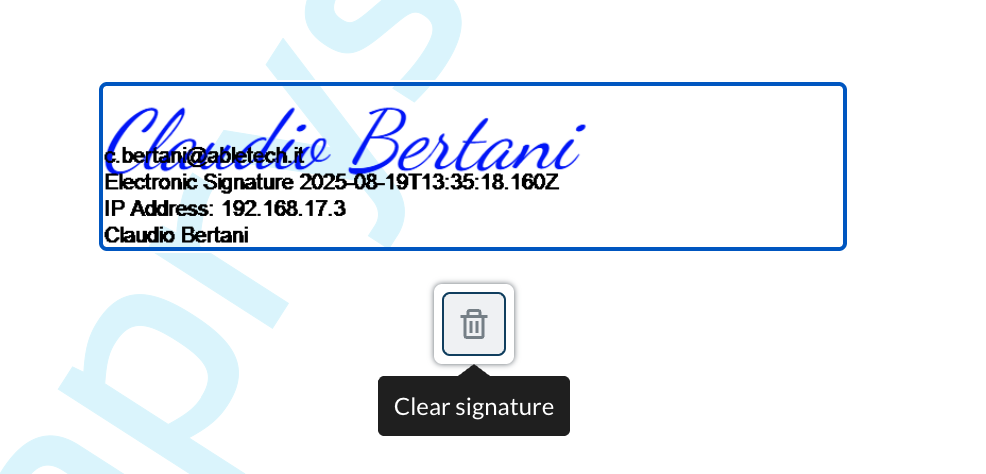
If I remove the first signature by clicking on the trash popup icon:


Then both appearances seems to be removed:

Is each digital signature represented by its own appearance/widget?

best regards,
Kevin

1 Like

Hi Kevin,

Thanks for the previous guidance on signature detection and styling - that was very helpful.

I have a follow-up question about widget styling using the getCustomStyles approach.

In our application, we’ve implemented dynamic background coloring for form fields using the WidgetAnnotation.getCustomStyles method as documented:

async changeBackgroundAnnotation(currentSignerId: string | null, signersOfSelectedDocument: SignerToShow[], currentDocument: DocumentDTO | undefined) {
    if (!currentDocument) {
        console.error('ERROR changeBackgroundAnnotation - CurrentDocument undefined');
        return;
    }
    const colors = {
        notAssigned: { background: [255, 183, 0], border: [0, 0, 0] }, 
        selected: { background: [0, 165, 228], border: [0, 0, 0] }, 
        notSelected: { background: [220, 220, 220], border: [0, 0, 0] },
    };

    const annotationCategories = this.categorizeAnnotations(currentSignerId, signersOfSelectedDocument);
    this.setupWidgetCustomStyles(annotationCategories, colors);
}

private setupWidgetCustomStyles(annotationCategories: { selectedSignerIds: Set<string>; standByIds: Set<string> }, colors: any) {
    const { selectedSignerIds, standByIds } = annotationCategories;
    const WidgetAnnotationClass = this.instance!.Core.Annotations.WidgetAnnotation as any;

    WidgetAnnotationClass.getCustomStyles = (widget: Core.Annotations.WidgetAnnotation) => {
        const widgetId = (widget as any).Id;

        if (standByIds.has(widgetId)) {
            return {
                'background-color': `rgba(${colors.notAssigned.background[0]}, ${colors.notAssigned.background[1]}, ${colors.notAssigned.background[2]}, 0.6)`,
                border: `2px solid rgb(${colors.notAssigned.border[0]}, ${colors.notAssigned.border[1]}, ${colors.notAssigned.border[2]})`,
            };
        } else if (selectedSignerIds.has(widgetId)) {
            return {
                'background-color': `rgba(${colors.selected.background[0]}, ${colors.selected.background[1]}, ${colors.selected.background[2]}, 0.6)`,
                border: `2px solid rgb(${colors.selected.border[0]}, ${colors.selected.border[1]}, ${colors.selected.border[2]})`,
            };
        } else {
            return {
                'background-color': `rgba(${colors.notSelected.background[0]}, ${colors.notSelected.background[1]}, ${colors.notSelected.background[2]}, 0.6)`,
                border: `2px solid rgb(${colors.notSelected.border[0]}, ${colors.notSelected.border[1]}, ${colors.notSelected.border[2]})`,
            };
        }
    };
}

Issue: This approach works perfectly for signature fields and text fields, but checkbox and radio button widgets remain with transparent background - the styling simply doesn’t get applied to them at all.

Environment:

  • WebViewer version: 11.7.1
  • The issue occurs with both UI-created fields (drag & drop) and programmatically created fields
  • We’ve confirmed that the getCustomStyles function is being called for all widget types through debug logging

Questions:

  1. Is there a known difference in how checkbox/radio widgets handle the getCustomStyles function compared to signature/text widgets in WebViewer 11.7.1?
  2. Are there any specific CSS properties or approaches that work better for checkbox and radio button styling?
  3. What is the recommended way to actually change the background color of checkbox and radio button widgets? Is there an alternative approach we should be using for these specific widget types?

Any insights into why checkbox and radio widgets behave differently would be greatly appreciated!

Best regards, William

1 Like

Hi there,

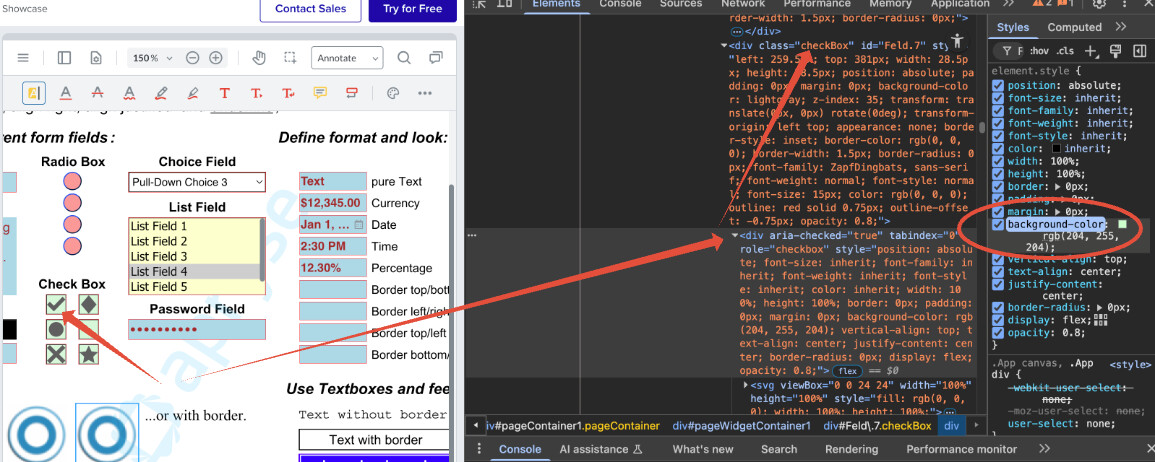
For CheckButtonWidgetAnnotations or RadioButtonWidgetAnnotations, you may have to style the container inside the widget. CSS properties to target the inner element should work for you:
i.e.

In the future, please create a new forum post or submit a ticket for any inquiries unrelated to the original topic.

Best regards,
Kevin

1 Like

Hi Apryse support,

We’re using WebViewer 11.7.1 and need guidance on the following workflow:

Use case:
We load PDFs that already contain cryptographic signatures, allow users to add new signature fields (unsigned), and then download the final PDF without corrupting the existing signatures.

The problem:
To prevent users from moving or modifying already-signed fields, we currently lock them via the annotation API:

annotation.Locked = true;
annotation.NoMove = true;
annotation.NoResize = true;
annotation.NoDelete = true;

We discovered this approach corrupts the existing signatures (likely because modifying annotation properties triggers a document change that invalidates the signed byte range).

What we need:
A way to make already-signed fields non-interactive purely at the UI/viewer level — without touching the underlying PDF structure or writing any changes to the signed portion of the document — so existing signatures remain cryptographically valid.

Specifically:

  1. Is there a recommended way to make signature fields read-only in the viewer without modifying the PDF data?
  2. Should we be using PDFNet / AnnotationManager flags differently to avoid document mutation?
  3. Are there viewer-level interaction locks (e.g., disabling drag/resize for specific annotation types) that don’t write back to the document?

Any code examples or documentation pointers for WebViewer 11.7.1 would be greatly appreciated.

Thank you,

William

1 Like

Hi there,

Yes that is correct. Modifying the annotations will break the signatures as it modifies the PDF.

While there is no built-in API to prevent interaction with certain annotations in the UI, you can achieve something similar by preventing an annotation from being selected by deselecting it:

annotationManager.addEventListener('annotationSelected', (annotations, action) => {
  if (action === 'selected') {
    annotations.forEach(async annotation => {
      if (annotation instanceof Annotations.SignatureWidgetAnnotation && await annotation.isSignedDigitally()) {
        console.log('deselecting signed widget');
        annotationManager.deselectAnnotation(annotation)
      }
    })
  }
})

Best regards,
Kevin

1 Like

Hi Kevin,

Thank you for the response, we were able to handle the signature widget interaction issue on our end.

We do however have a related problem we’d like your help with.

When we load a signed PDF that contains Link annotations embedded in the signed byte range, those annotations appear to be destroyed and
recreated by the WebViewer as part of the document loading process. Since the signature’s ByteRange covers the entire file, this immediately invalidates the
signature, even before the user interacts with anything.

To be clear: no user action is involved. The corruption happens purely as a side effect of loading the signed document.

We’ve already tried filtering Link annotations out of the XFDF via exportAnnotations({ links: false }) when calling getFileData, but this does not seem to
prevent the issue.

Is there a way to prevent Link annotations from being imported into the annotation manager during document load, without putting the document in read-only
mode? How can we solve?

Any guidance would be greatly appreciated.

Best regards,
William
1 Like

Hi there,

There is no built-in flag to filter out annotations from being imported. It looks like we are going to need a sample file to help troubleshoot this issue.

Could you please submit a new ticket at our support channel here:

Best regards,
Kevin

1 Like

Hi Kevin,

Thank you for your reply.

As requested, I am attaching two sample files to help reproduce the issue:

  • sample_with_link.639160752639452483.pdf — the original signed PDF, with a valid digital signature and a Link annotation embedded within the signed byte range. The signature validates correctly at this stage.

  • sample_with_link.639160752639452483_afterUploadWebviewer.pdf — the same PDF immediately after being loaded in WebViewer, without any user interaction. As you can see, the signature is already invalidated at this point.

We look forward to your guidance on this.

Best regards,
William

sample_with_link.639160752639452483.pdf (45.9 KB)

sample_with_link.639160752639452483_afterUploadWebviewer.pdf (46.8 KB)

1 Like

Hi there,

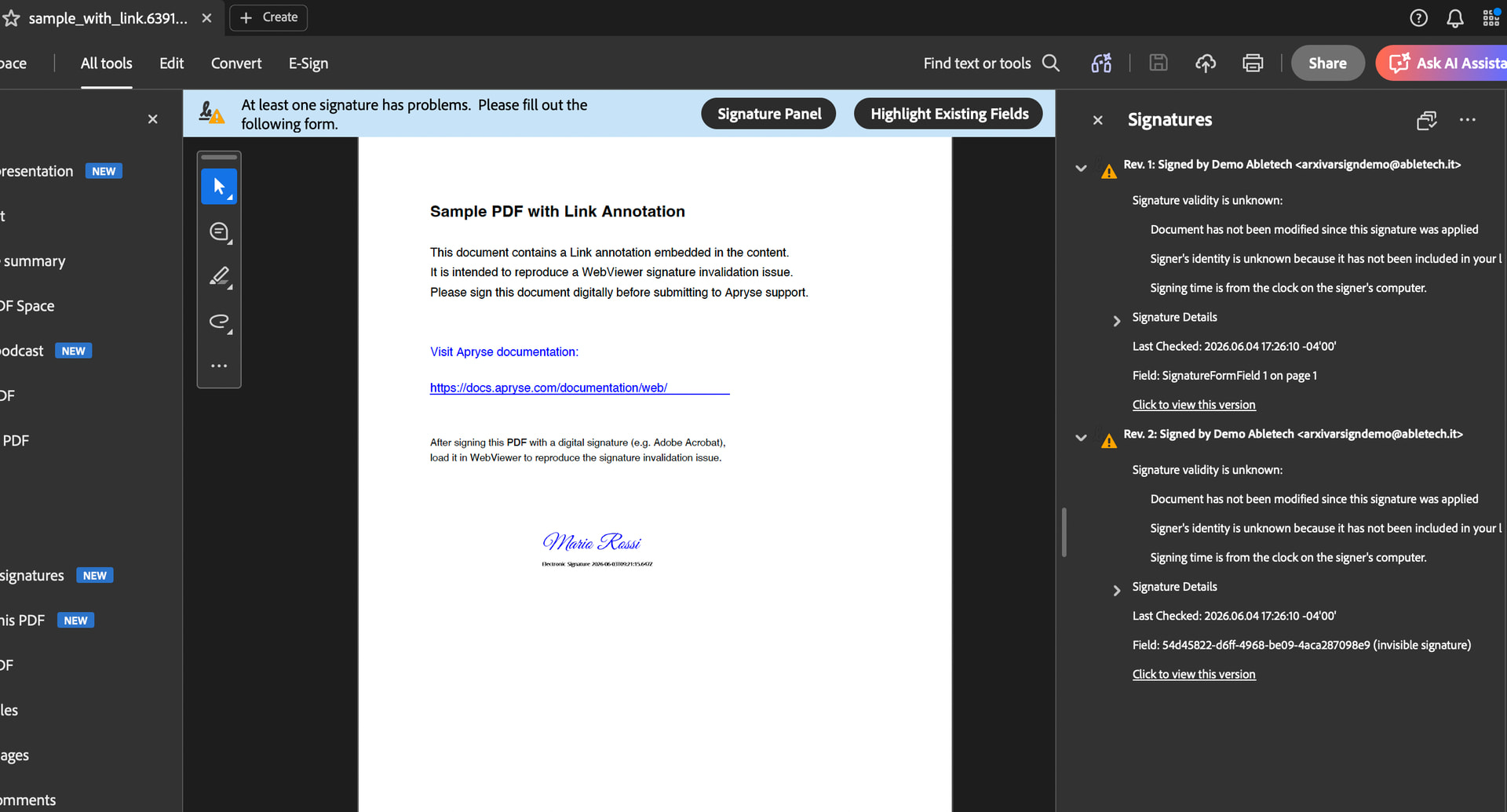
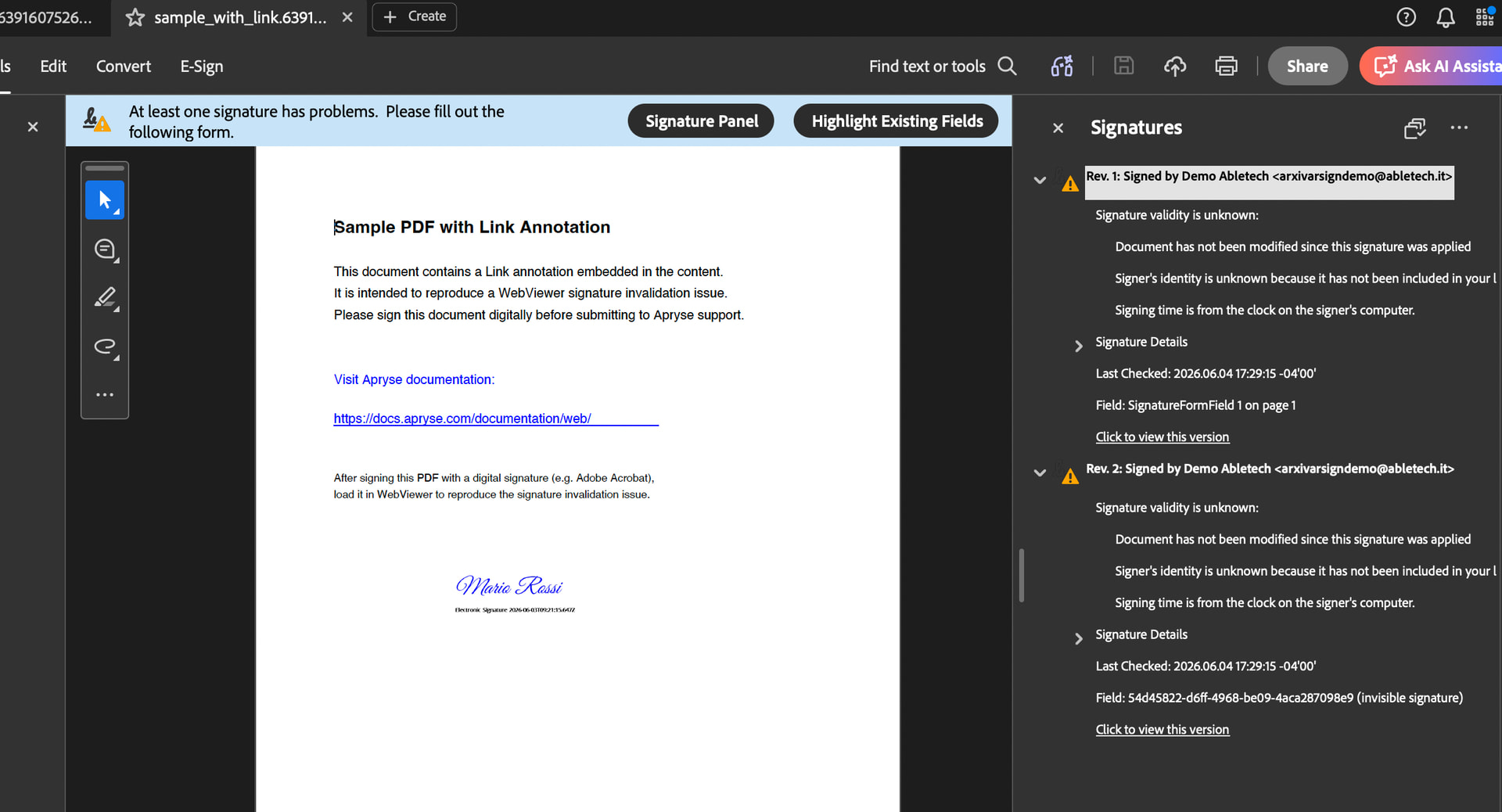
Could you verify what you mean by invalidated signature? From my testing, both files show the same signature validity on Adobe. (tested with sample_with_link.639160752639452483.pdf )

This is the status before uploading to WebViewer:

After uploading and downloading it on WebViewer:

To clarify, I used WebViewer 11.13.0, and had the same conditions:

  • Valid license to prevent watermark
  • Download via incremental flag
    instance.UI.downloadPdf({ flags: instance.Core.SaveOptions.INCREMENTAL });

Best regards,

Kevin

1 Like