Hello,
Thank you for providing the code. There are a few things that need to be changed within it so that the appearance works as expected.
For the create appearance function, you must set the text matrix so that it is placed properly on the resulting document:
private static Obj CreateCheckmarkAppearance(PDFDoc doc, Rect updateRectangle, string text)
{
    // Create a checkmark appearance stream
    var build = new ElementBuilder();
    var writer = new ElementWriter();
    writer.Begin(doc);

    //// Draw background
    Element e = build.CreateRect(updateRectangle.x1, updateRectangle.y1, updateRectangle.x2, updateRectangle.y2);
    e.SetPathFill(true); // this path is should be filled

    // Set the path color space and color
    GState gstate = e.GetGState();
    gstate.SetFillColorSpace(ColorSpace.CreateDeviceRGB());
    gstate.SetFillColor(new ColorPt(1, 0, 0)); // red
    writer.WriteElement(e);

    // Draw checkmark
    writer.WriteElement(build.CreateTextBegin());

    // other options are circle ("l"), diamond ("H"), cross ("\x35")
    // See section D.4 "ZapfDingbats Set and Encoding" in PDF Reference
    // Manual for the complete graphical map for ZapfDingbats font.
    e = build.CreateUnicodeTextRun(text, Font.Create(doc, Font.StandardType1Font.e_zapf_dingbats), 18);
    e.SetTextMatrix(new Matrix2D(1, 0, 0, 1, updateRectangle.x1, updateRectangle.y1));
    e.GetGState().SetFillColor(new ColorPt(0, 0, 0));
    writer.WriteElement(e);
    writer.WriteElement(build.CreateTextEnd());

    Obj stm = writer.End();

    // Set the bounding box
    stm.PutRect("BBox", updateRectangle.x1, updateRectangle.y1, updateRectangle.x2, updateRectangle.y2);
    stm.PutName("Subtype", "Form");

    return stm;
}
For checkboxes, there is an extra step in setting different appearances for the checked and unchecked states. Something like the following function will work:
static void SetCheckboxApp(Widget wg, Annot.AnnotationState state, bool on, Obj appearence)
{
    Obj wgObject = wg.GetSDFObj();
    if (wgObject == null) return;
    Obj ap = wgObject.FindObj("AP");
    if (ap == null)
    {
        ap = wgObject.PutDict("AP");
    }
    Obj anstate = null;
    switch (state)
    {
        case Annot.AnnotationState.e_normal:
            {
                anstate = ap.FindObj("N");
                if (anstate == null) anstate = ap.PutDict("N");
                break;
            }
        case Annot.AnnotationState.e_down:
            {
                anstate = ap.FindObj("D");
                if (anstate == null) anstate = ap.PutDict("D");
                break;
            }
        default:
            {
                return;
            }
    }

    if (on)
    {
        anstate.Put("On", appearence);
    } else
    {
        anstate.Put("Off", appearence);
    }
}
Finally, you can call the functions like so. Please note that you should not be calling RefreshAppearence as it will wipe the custom appearances:
var rect = new Rect(0, 0, 30, 30);
var widget = CheckBoxWidget.Create(doc, rect);

Obj down = CreateCheckmarkAppearance(doc, rect, "H");
Obj up = CreateCheckmarkAppearance(doc, rect, "1");

SetCheckboxApp(widget, Annot.AnnotationState.e_normal, true, down);
SetCheckboxApp(widget, Annot.AnnotationState.e_normal, false, up);

widget.SetChecked(true);
page.AnnotPushFront(widget);
doc.Save("output.pdf", SDFDoc.SaveOptions.e_linearized);
Note that Adobe Reader might not display the custom appearance if its form highlighting feature is set:
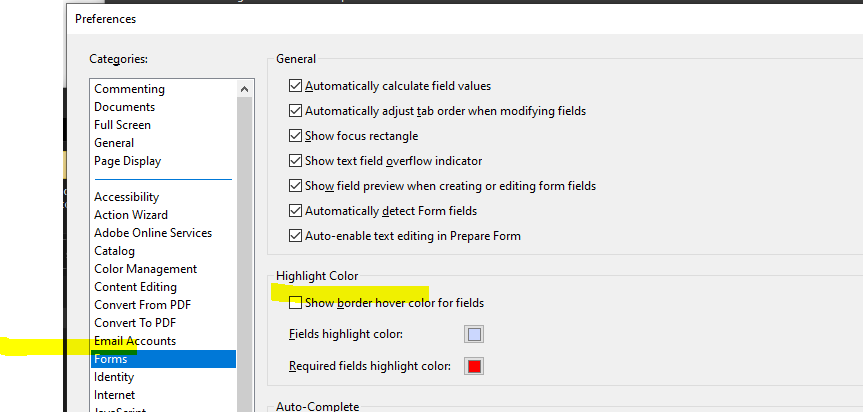
Please let me know if this works for you.