Could you help me with the functionality of including a custom button in the officeEditorToolsHeader?
I’m using version 11.4.0.
1 Like
Hello, I’m AiRon, an automated tech support bot 
While you wait for one of our customer support representatives, I can help you with your question.
Including a custom button in the
officeEditorToolsHeader involves using the Modular UI configuration in WebViewer. This allows you to define a custom button with specific properties like icon, title, and onClick behavior.Some things you can try:
- Define your custom button using the Modular UI configuration JSON object. Specify the icon, title, and function for the onClick event.
- Import this configuration into WebViewer using the
setCustomHeadersor similar methods to add your button to theofficeEditorToolsHeader. - Ensure that the function map includes the actions you want to trigger when the custom button is clicked.
Here are some resources that might help you:
- UI Import and Export Basic Modular UI Example - Learn how to create and import a UI configuration with custom buttons.
- Items Custom Buttons - Understand how to create custom buttons and set their properties.
- Migrating to V11 Modular UI - Get insights on how to work with Modular UI components like headers.
- Customizing Viewer Toolbar / Header - Although this focuses on legacy UI, it gives a good context for header customization.
Hopefully, this helps you solve your problem while you wait for a human to get back to you.
1 Like
Hi Vitormf,
In modular UI, you can add an element in the header you want.
You have to create your element:
 // Create your custom button
  const myCustomBtn = new UI.Components.CustomButton({
    dataElement: 'myCustomHeaderBtn',
    label: 'My Button',
    title: 'Do Something',
    img: 'icon-custom',  // you can use built-in icons or path
    onClick: () => {
      console.log('Custom button clicked');
      // your logic here
    },
    style: {
      // optional styles
      marginLeft: '8px'
    }
  });
You then need to get the header you want to add the button to and add the element you created:
 // Get the default top header
  const defaultHeader = UI.getModularHeader('default-top-header');

  // Add the button to the header's items
  defaultHeader.setItems([...defaultHeader.items, myCustomBtn]);
In this case, the button is added at the end of the header items:
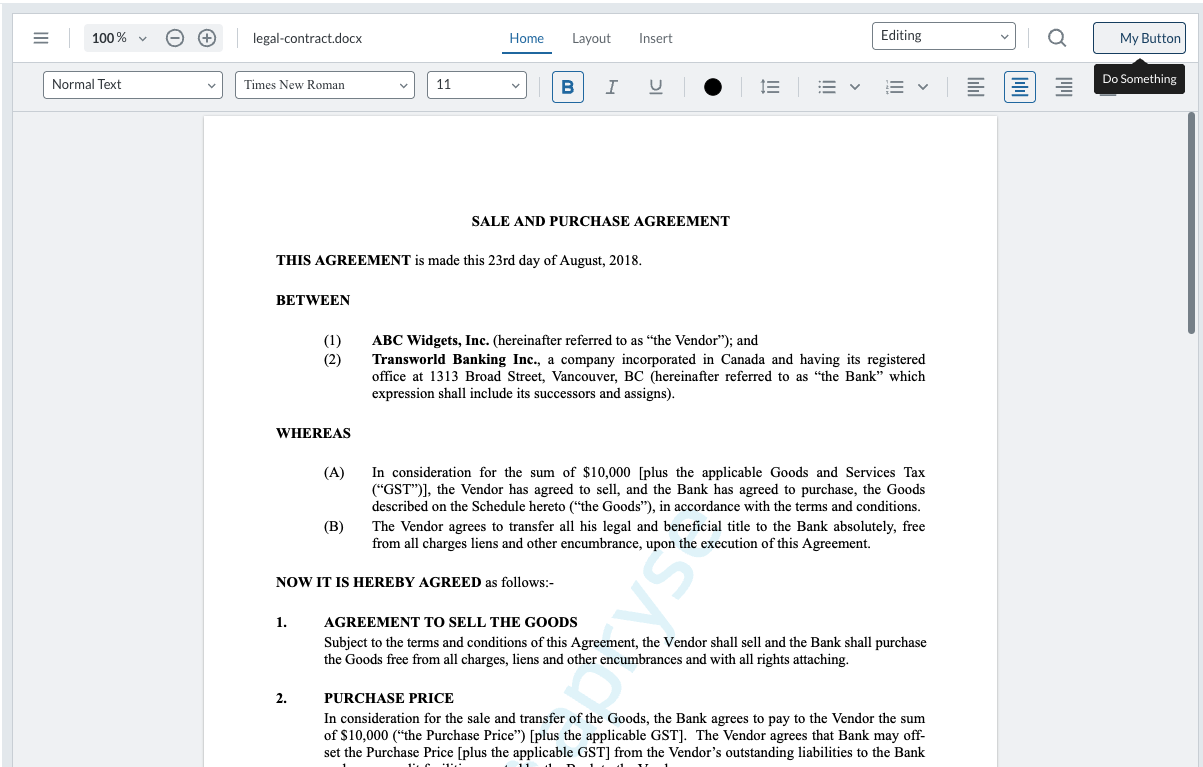
Let us know if you have any questions.
Best Regards,
Mickaël.
1 Like