When modifying a drawn Callout’s fontsize (by doubleclicking and using the popup menu) via the dropdown, then the new fontsize is rendered, but it seems the Callout’s data still has the old fontsize.
Example:
Draw callout (fontsize initially e.g. 22pt)
Doubleclick callout and editing popup opens
Use the dropdown and choose a new fontsize (e.g. 40pt)
Print out the callout’s new fontsize afterwards => 22pt (old value)
Consequence:
Also a visible sideeffect of this is, that the function “fitText” afterwards not works correctly.
It is meant to resize the callout’s bounds so that it fits the textcontent.
But since the callout still has the old fontsize, the calculation does not work.
The bounds are calculated with the 22pt and the text (40pt) does not fit inside.
Hello, I’m AiRon, an automated tech support bot While you wait for one of our customer support representatives, I can help you with your question.
It appears that you are experiencing an issue where the font size of a callout annotation in WebViewer is not updating correctly in the annotation’s data model, even though it visually changes. This discrepancy affects the behavior of functions like fitText, which rely on the correct font size to adjust the annotation’s bounds.
Some things you can try:
Ensure that any changes made to the annotation’s properties through the UI are also explicitly updated in the annotation’s data model.
After modifying the font size, programmatically update the annotation’s font size property by retrieving the annotation object and setting the font size directly.
Invoke the fitText function after ensuring the annotation’s data has been updated with the correct font size.
Use event listeners to capture changes in the UI and apply them to the annotation object.
Here are some resources that might help you:
Editing Annotations - Provides information on how to programmatically modify annotations and ensure data consistency.
Customizing WebViewer UI Popups - Offers insights into customizing and managing popups, which might help in syncing UI changes with data.
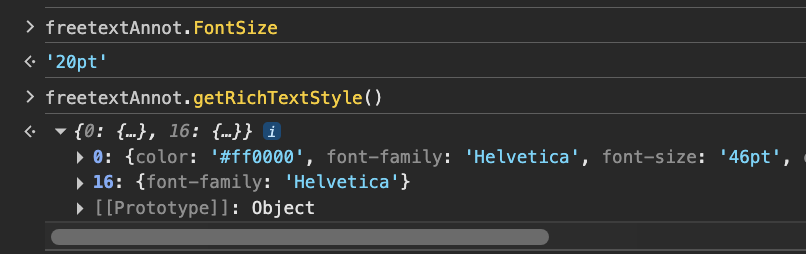
When changing the font size of the text by double-clicking, this changes the rich text of the annotation rather than the annotation’s font size. Below is an example of what you may see following the steps you have provided:
In order to use fitText as intended, the annotation’s font size needs to be updated which you can do by selecting the annotation without double-clicking.