Please give a brief summary of your issue:
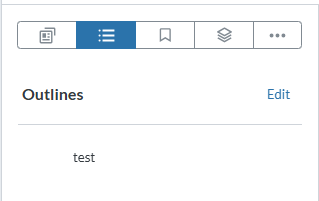
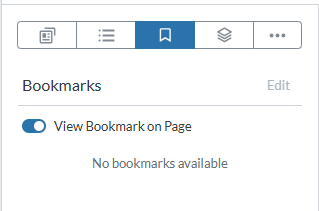
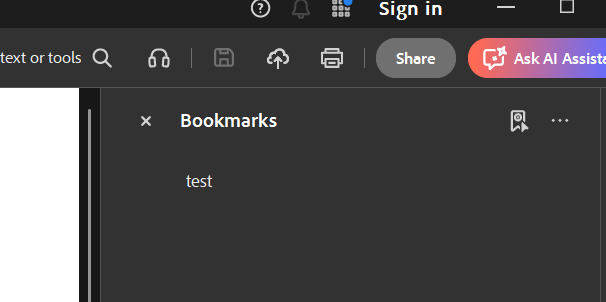
When I add bookmarks to a pdf using Adobe and when I try to view this pdf file using WebViewer, I can see those bookmarks in the Outlines panel and not the Bookmarks panel. Why is this so? And how can I view them in the Bookmarks panel instead of the Outlines?
Please provide a link to a minimal sample where the issue is reproducible:
You can upload the file in your demo environment and reproduce the issue: Table of Contents Editing | Apryse WebViewer
This is a test file where you can see the issue: Test Document.pdf (31.7 KB)
And on adding an outline and bookmark in a pdf file using WebViewer and downloading it and viewing in Adobe, I can see only the Outline that was added previously in the Bookmarks section of Adobe but I cannot find the Bookmark that was previously added anywhere.
Where does that get stored?
Are the bookmarks added using Webviewer saved to the pdf?
Hello, I’m AiRon, an automated tech support bot While you wait for one of our customer support representatives, I can help you with your question.
It seems like you are experiencing a common confusion between bookmarks and outlines in PDF documents. In the context of PDFs and WebViewer, “outlines” and “bookmarks” are often used interchangeably, but they can sometimes be managed differently depending on the software being used. In WebViewer, the default panel for viewing bookmarks is referred to as the “Outline” panel.
Some things you can try:
Ensure that the bookmarks you are creating in Adobe are compatible with the WebViewer’s outline structure.
Check if the bookmarks are correctly structured in the PDF file itself. Sometimes, the internal structure might affect how they are displayed.
Verify if there is any specific customization or configuration in your WebViewer setup that affects how bookmarks are displayed.
Consider enabling the Outline panel to ensure that bookmarks appear correctly within the WebViewer interface.
Here are some resources that might help you:
User Bookmarks Guide - This guide shows how to manage and export user-defined bookmarks in WebViewer.
Our support bot Ari has provided a pretty good summary of the difference between Outlines and User Bookmarks in WebViewer. Feel free to check out the guides they’ve provided for more information.
In summary, Outlines in WebViewer are the bookmarks that you expect in Adobe, while User Bookmarks in WebViewer function more of a user-specific bookmark that allow users to quickly navigate without embedding the information into the document.
Let us know if you need further clarification!
Best Regards,
Jacob Romano Carlsen
Web Development Support Engineer Apryse Software Inc.