Compare documents by image, pixels in Angular?

WebViewer Version: 10.8

Do you have an issue with a specific file(s)? No
Can you reproduce using one of our samples or online demos? No
Are you using the WebViewer server? No
Does the issue only happen on certain browsers? No
Is your issue related to a front-end framework? Yes
Is your issue related to annotations? No

Please give a brief summary of your issue:
Compare documents by image, pixels in Angular?

Please describe your issue and provide steps to reproduce it:
Good day,

I need to partially reproduce the Sync Diff Viewer example from this online demo but written in Angular-Typescript. I did notice also the sample written here does not seem to match what is in the online demo (Compare PDF documents using Javascript | Apryse documentation)

Anyway, I am trying this on an empty angular project first but on initialization, I am already running into problems with the component finding the Core and PDFNet namespace:

import { Component, AfterViewInit, ElementRef, ViewChild } from "@angular/core";
import WebViewer, { Core, UI, WebViewerInstance } from "@pdftron/webviewer";

@Component({
  selector: "app-three-panel-compare",
  standalone: true,
  templateUrl: "./three-panel-compare.component.html",
  styleUrls: ["./three-panel-compare.component.css"],
})
export class ThreePanelCompareComponent implements AfterViewInit {
  @ViewChild("basePanel", { static: true }) basePanel!: ElementRef;
  @ViewChild("resultPanel", { static: true }) resultPanel!: ElementRef;
  @ViewChild("overlayPanel", { static: true }) overlayPanel!: ElementRef;

  private instances: any = {};
  private viewers: any[] = [];
  private scrollTimeout: any;
  private originalScroller: any;
  private isLoading = false;
  private pdfWorkerTransportPromise: any;
  private officeWorkerTransportPromise: any;

  async ngAfterViewInit(): Promise<void> {
    await Core.PDFNet.initialize();

    Core.setWorkerPath("../lib/core");
    Core.enableFullPDF();

...

In this snippet of my component class, .PDFNet, .setWorkerPath() and .enableFullPDF() will throw an object undefined error. Is there supposed to be a correct way to perform these initialization functions?

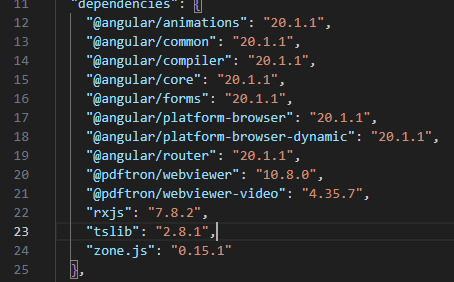
For reference, this is the package.json of the project:
Please provide a link to a minimal sample where the issue is reproducible:
N/A


1 Like

Hello, I’m AiRon, an automated tech support bot :robot:
While you wait for one of our customer support representatives, I can help you with your question.


It seems you’re trying to integrate WebViewer into an Angular project and are facing issues with the initialization of WebViewer’s Core and PDFNet namespaces. This is a common setup issue, especially when adapting examples from different environments or frameworks.

Some things you can try:

  • Ensure that the WebViewer library is correctly installed in your Angular project. You can do this by running npm install @pdftron/webviewer.

  • Check your import statements. Make sure that you’re importing WebViewer correctly and that your paths to the core library are correctly set up.

  • Verify that the WebViewer’s core worker files are located in the correct directory that matches the path you specify in Core.setWorkerPath().

  • Check that you have included the necessary WebViewer assets in the angular.json file under the “assets” section to ensure they are available at runtime.

  • Ensure that the PDFNet.initialize() method is called correctly and that the WebViewer’s core and UI components are properly initialized.


Here are some resources that might help you:


Hopefully, this helps you solve your problem while you wait for a human to get back to you.

1 Like

Also to include that even the Core.initPDFWorkerTransports(...) throws an object undefined error. I believe I need the resulting promise from this function it is also a parameter in the WebViewer(...) initialization

1 Like

Hi there,

Using the Core APIs such as setWorkerPath and initPDFWorkerTransports are typically used for when you are not using WebViewer.

With Angular, (and with the @pdftron/webviewer package) you have access to client side instance available for you to call from - instance.Core

You can see an example Angular integration here:

An example snippet for the comparison sample can be found here:

In WebViewer context, you can call these after the initialization, i.e.

ngAfterViewInit(): void {
    WebViewer({
        ...
    }, this.viewer.nativeElement).then(instance => {

            // call instance.Core APIs here
    })
}

Best regards,
Kevin

1 Like

Hi, Kevin.

Where can I find the source code for the Side by Side Synced viewers diff sample demo site? We are interested in this 3 panel view.

1 Like

Hi there,

This sample is provided in the packed download available here:

There is also a live sample available here:

(the Diff Documents sample)

best regards,
Kevin

1 Like

Hi, Kevin.

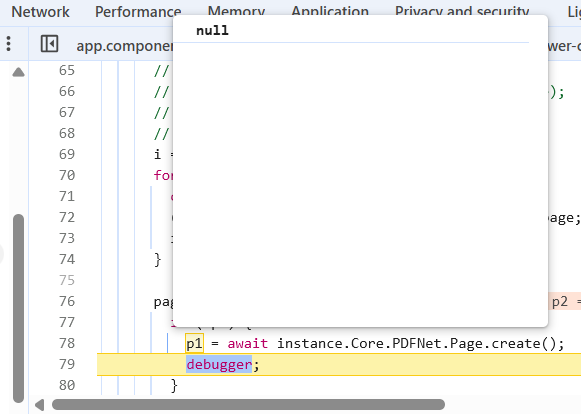
Thank you! I might as well ask. I was trying other compare by pixel snippets and I’m getting console errors on the new instance.Core.PDFNet.Page(); lines

      pages.forEach(async ([p1, p2]) => {
        if (!p1) {
          p1 = new instance.Core.PDFNet.Page();
          debugger;
        }
        if (!p2) {
          p2 = new instance.Core.PDFNet.Page();
          debugger;
        }

        await newDoc.appendVisualDiff(p1, p2, options);
      });

If I change it to await instance.Core.PDFNet.Page.create(); there’s no error but always returns null.

This is on WebViewer 10.8. From the snippets, the constructor had a parameter but it was being rejected by typescript:

1 Like

Hello

The correct way would be the second one noted:

const newDoc = await PDFNet.PDFDoc.create();

Can you provide the code around your forEach?

Best regards,
Tyler

1 Like