So we added these custom translation file under webviewer/ui/i18n/translation-da.json
When user change language we call the setLanguage and it used to pull the correct translation till version 11.7.1
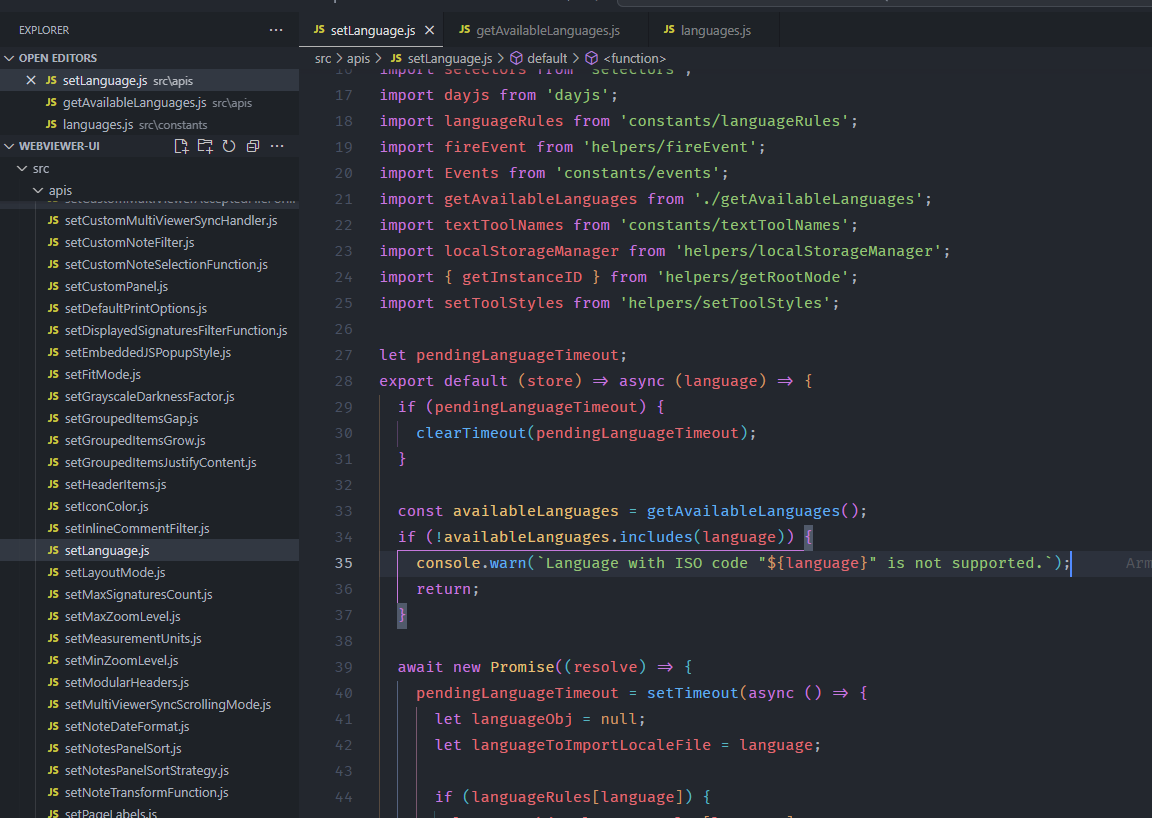
But from the 11.8 this stopped work and found that if the language not available from language constant you are preventing the custom language getting fetched and getting the warning in the console.
npm i && npm start (updated the copy node script to copy dummy Danish file to the webviewer/ui/i18n/translation-da.json)
Click the Change language to Danish button. It should change the language but its not working. If you downgrade to the 11.7.1 or previous this is working.
Please provide a link to a minimal sample where the issue is reproducible:
Hello, I’m AiRon, an automated tech support bot While you wait for one of our customer support representatives, I can help you with your question.
It seems you’re experiencing issues with custom language translations in WebViewer version 11.8. The setLanguage function appears to not work as expected when using custom translations, particularly for languages not included in the default set.
Some things you can try:
Ensure that your custom translation files are correctly formatted and placed in the appropriate directory (webviewer/ui/i18n/).
Check if the language code you are using is correctly mapped in your implementation.
Verify if there are any console warnings or errors that might provide more context on why the language is not loading.
Consider downgrading to a previous version (11.7.1) where the functionality was working, as a temporary workaround.
Ensure that your implementation follows the updated guidelines for custom translations, as there might have been changes in the API behavior.
This is a known issue and is being worked on by the development team.
We will let you know when have more information.
One workaround you could use is to use one of the supported languages in the list, i.e. translation-es.json file and replace all of that with the Danish translations.
Then you can use the setLanguage API and use the ‘es’ value instead: await instance.UI.setLanguage("es");
Hi @kkim
Thanks for the quick support . For now we’ve reverted back to the previous version and don’t want to use the workaround for now.
I also noticed that based on the language settings, dayjs localization is automatically loaded. I’m curious about how this will work for custom languages as well. Looking at thesetLanguage.js
code, I can see it tries to import dayjs locale files and falls back to English if not found.
For custom languages, how should we handle dayjs localization? Should we:
Map custom languages to existing dayjs locales via languageRules?
Is there documentation on how to properly configure this?
Will custom languages always fall back to English dayjs locale?
Please point me to documentation or the recommended approach for handling dayjs localization with custom languages.
We don’t have a guide on this beyond the creation of the translation files:
From the UI code, as you mentioned, it will default to English if a matching locale file is not found:
You should be able to handle the dayjs localization via updating the existing languageRules.
You may also need to change the active locale based on their documentation here:

 . For now we’ve reverted back to the previous version and don’t want to use the workaround for now.