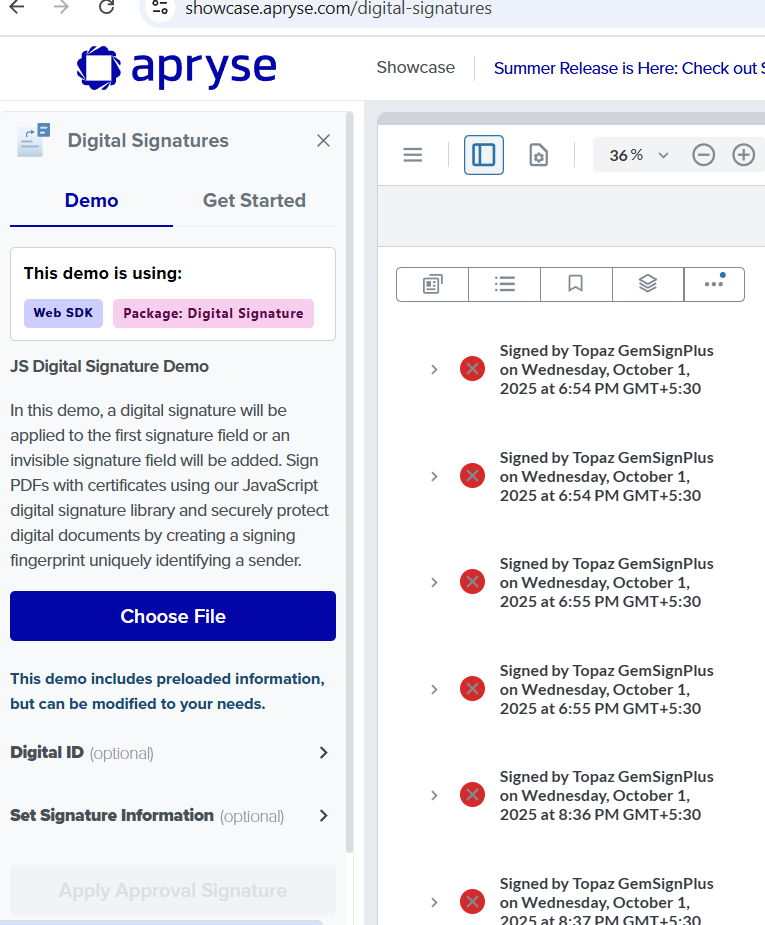
We have applied some digital signatures from with Topaz Gem signatures with ‘SHA-1’ algo. When we are loading that file in the web viewer and open signature tab, All signatures are showing as corrupted.
I am getting same issue on your demo site as well with same file.
Please investigate and address this issue on a priority basis, as it is impacting our production use case and we are using paid license version with full API.
Hello, I’m AiRon, an automated tech support bot While you wait for one of our customer support representatives, I can help you with your question.
It seems you’re encountering an issue with digital signatures displayed as corrupted in WebViewer. This could potentially be due to the specific way signatures are being handled or displayed in the current version of WebViewer.
Some things you can try:
Ensure that the digital signature is correctly applied and valid in other PDF viewers to rule out any issues with the signature itself.
Check if the issue persists with different algorithms or signature methods, as SHA-1 might be part of the problem.
Verify that your WebViewer setup is correctly configured and that no additional security settings are interfering with signature display.
Consider updating to the latest version of WebViewer, as there might be fixes or improvements related to digital signatures.
WebViewer Overview - Offers an overview of WebViewer’s capabilities, which might help in diagnosing configuration issues.
Searching PDF Documents - Although focused on search, this guide can help verify if the document is being processed correctly.
Slow Loading FAQ - While primarily about performance, it includes tips on ensuring your setup is optimal, which might affect how signatures are displayed.
Hopefully, this helps you solve your problem while you wait for a human to get back to you.