Do you have an issue with a specific file(s)? Yes
Can you reproduce using one of our samples or online demos? Yes
Are you using the WebViewer server? No
Does the issue only happen on certain browsers? No
Is your issue related to a front-end framework? No
Is your issue related to annotations? No
Please give a brief summary of your issue:
(Think of this as an email subject)
When text is entered into the cell, the Cursor moves abnormally.
Please describe your issue and provide steps to reproduce it:
(The more descriptive your answer, the faster we are able to help you)
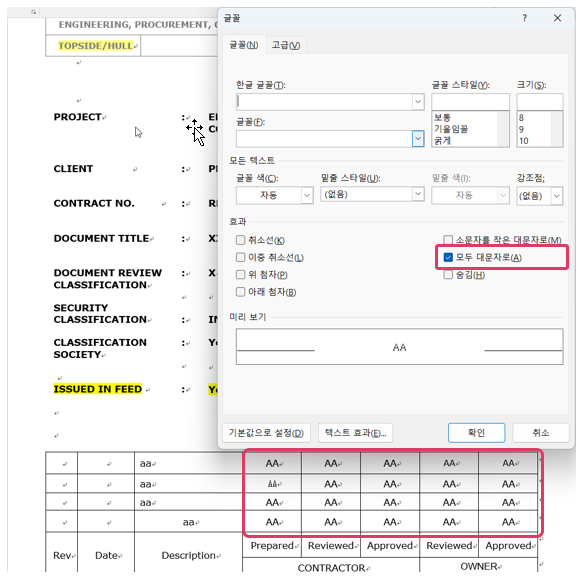
Place letters on top of the table and when there is no border
(Interim PROJECT to ISSUED IN FEED)
If ‘all uppercase letters’ are checked in Word font settings, Cursor moves when entering the value (Press Shift and enter, there is no problem, Refer to the red box in the attached image)
Hello, I’m AiRon, an automated tech support bot While you wait for one of our customer support representatives, I can help you with your question.
It seems like you’re experiencing an issue with the cursor behavior when editing DOCX files in Apryse’s WebViewer. This can be particularly tricky if the problem is related to text formatting or specific document settings like “all uppercase letters” in Word font settings.
Some things you can try:
Ensure that the DOCX file formatting is consistent. Sometimes, formatting issues in the source document can lead to unexpected behavior.
Check if the issue persists when you disable specific font settings like “all uppercase letters” to isolate the problem.
Try updating your WebViewer library to ensure you have the latest fixes and improvements.
Test the behavior in different environments to confirm if it’s a consistent issue across platforms or browsers.
Here are some resources that might help you:
WebViewer Features Guide - Provides an overview of the viewer’s capabilities and settings you might adjust.
Creating Office Documents Guide - Offers insights into handling Office documents, which might help in understanding DOCX handling specifics.
Text Extraction Guide - Useful if you need to troubleshoot how text is managed within documents.
This is Kaden from the Apryse Support Team – thank you for bringing this issue regarding a cursor position exception to our attention, seen when utilizing our DOCX editor demo on our website.
I’ve been able to reproduce the issue you detailed using the document you provided, and as such, I have reported the issue to our Engineering team for further investigation. I will reach out here as soon as I receive an update regarding this investigation. In the meantime, please don’t hesitate to reach out here or via our Support Portal if you have any further questions or issues.
Best,
Kaden Rettig
Technical Support Engineer
Apryse Support Team
I’m reaching out to let you know that the internal exception causing this cursor re-positioning behavior has been resolved in the latest internal version of WebViewer. This fix will be included with the next Stable release of WebViewer, which is currently planned for April 1st, 2026. If you have any questions or issues regarding WebViewer or the PDFNet SDK, please don’t hesitate to reach out here or via our Support Portal.
Thank you,
Kaden Rettig
Technical Support Engineer
Apryse Support Team