Do you have an issue with a specific file(s)? no
Can you reproduce using one of our samples or online demos? no
Are you using the WebViewer server? no
Does the issue only happen on certain browsers? no
Is your issue related to a front-end framework? no
Is your issue related to annotations? no
Please give a brief summary of your issue:
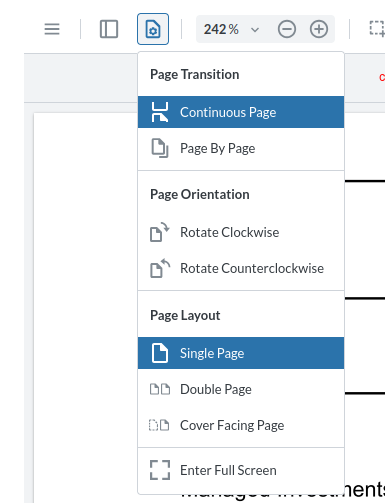
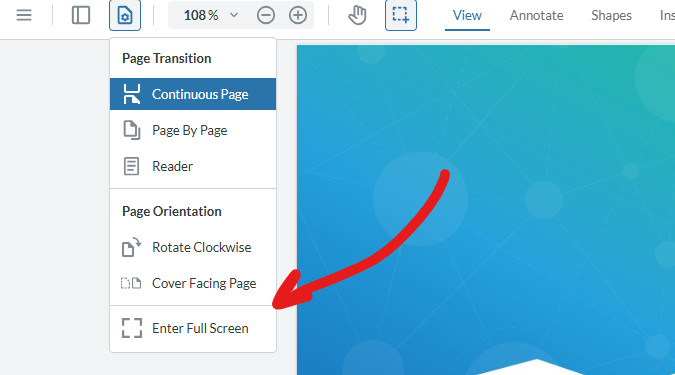
How to hide Page Layout menu under View Controls flyout?
Please describe your issue and provide steps to reproduce it:
I want to hide entire Page Layout submenu under view controls
Please provide a link to a minimal sample where the issue is reproducible:
I’m able to hide individual buttons under Page Layout using disabledElements but it leaves the label
Hello, I’m AiRon, an automated tech support bot While you wait for one of our customer support representatives, I can help you with your question.
To hide the entire Page Layout submenu under the View Controls flyout in WebViewer, you can modify the UI by accessing and customizing the flyout items. It seems like you are already on the right track by trying to filter out specific buttons. However, to completely hide the submenu, you might need to ensure the entire group of elements related to Page Layout is removed or hidden.
Some things you can try:
Ensure that you are correctly identifying and removing all related elements, not just individual buttons.
Consider using the disableElements method to target specific UI components effectively.
Use instance.UI.disableElements to disable the entire Page Layout section if it’s grouped under a specific data element.
Check if there are grouped data elements that encompass the entire Page Layout section.
Here are some resources that might help you:
Modular UI Items: Learn about customizing UI components and managing items in the View Controls flyout.
In order to hide the “Page Layout” section of our “View Controls” flyout, we recommend the setItems() API to override which items will be in that flyout. Please try using the documentLoaded event and seeing if that resolves the issue.
An example would look like this:
  instance.Core.documentViewer.addEventListener('documentLoaded', async () => {
    console.log('document loaded');
    const viewControlsFlyout = instance.UI.Flyouts.getFlyout('viewControlsFlyout');
    // remove items at indices 7-11 (zero-based), aka the items in the "Page Layout" section
    viewControlsFlyout.setItems(viewControlsFlyout.items.filter((item, index) => index < 7 || index > 11));
  });