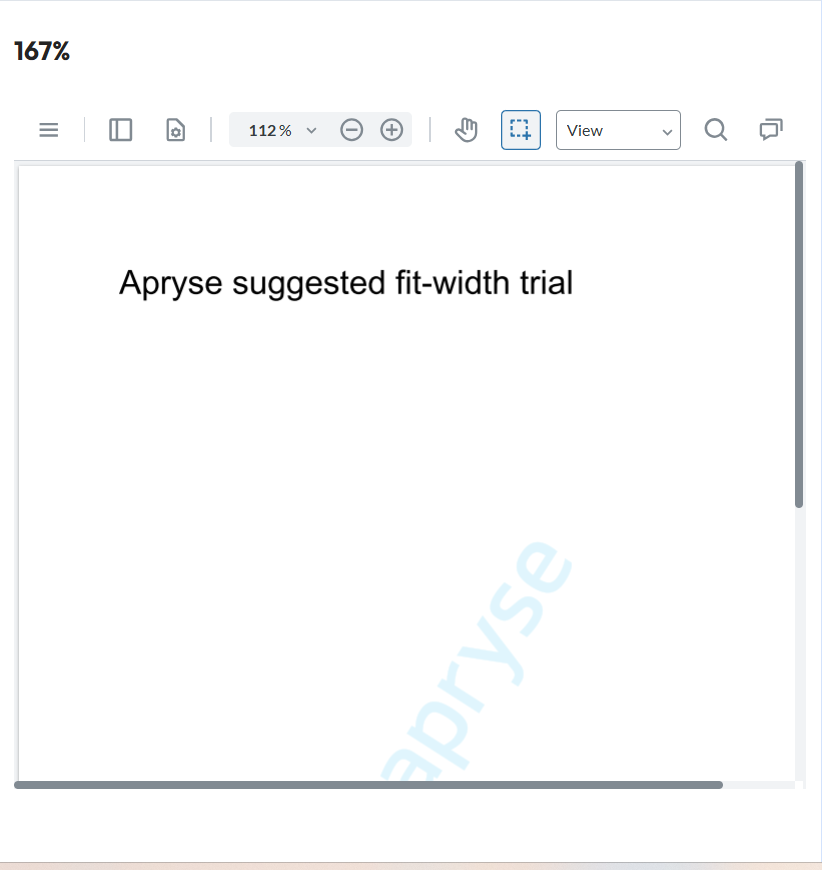
Hi Apryse team,
We use WebViewer 12.2.0 in a React application.
Documents open fitted to the whole page. In our short, wide viewer, this results in about 61% zoom, making the document difficult to read.
We would like to:
- Automatically fit the document to the viewer’s width, capped at 167%.
- Apply this before the first page renders and recalculate when the viewer container resizes.
- Allow users to manually zoom above 167%, preserving their manual zoom on resize.
- Keep “Fit width” recognized in the zoom menu.
Does WebViewer provide a built-in setting or supported API for this behavior? If not, what approach do you recommend?
We do not want a global maximum zoom, because users must still be able to zoom higher manually.
Thanks.
Hi Satish,
To set the default zoom to fitWidth, you can use this code snippet:
instance.UI.setFitMode(instance.UI.FitMode.FitWidth)
I’m not sure I understand what you mean by:
If you could elaborate, this would help us.
Let us know if that works or if you have any questions.
Best Regards,
Mickaël.
Hi Mickael,
Thanks. We understand that setFitMode(FitWidth) enables normal fit-width.
The additional requirement is to cap only the automatically calculated zoom, not manual zoom. For example:
If fit-width calculates 139%, use 139%.
If fit-width calculates 252%, automatically use 167% instead.
The user must still be able to press + and zoom above 167%.
On container resize, this capped calculation should run while automatic fit-width is active. If the user manually changes zoom, resizing should preserve their chosen zoom.
Is there a supported way to implement this automatic-only cap, ideally before the first page renders?
We have tested a custom fit function using Math.min(originalFitWidth.call(this), 1.67), assigned to the instance’s FitMode.FitWidth and defaults.FitMode, then activated through documentViewer.setFitMode() before loading the document.
Is that supported, or would you recommend another approach?
Thanks.
Hi Satish,
Thank you for your reply.
I believe you could achieve the result you’re looking for like this:
UI.addEventListener(UI.Events.VIEWER_LOADED, () => {
    instance.UI.setFitMode(instance.UI.FitMode.FitWidth);
    const zoomLevel = (instance.UI.getZoomLevel() * 100);
    if (zoomLevel > 167) {
        UI.setZoomLevel(1.67)
    }
})
This way, you set the fitWidth as soon as Webviewer is loaded; if it’s over 167; you set the cap. This will still allow your user to increase the zoom if they’d like.
If they switch back to fitWidth, you can detect it like this and reapply the same logic:
documentViewer.addEventListener('fitModeUpdated', fitMode => {
    if(fitMode === documentViewer.FitMode.FitWidth){
      apply zoom logic
    }
});
Would this work for you?
Best Regards,
Mickaël.
Hi Mickael,
Thank you for your suggestion. We tested it with WebViewer 12.2.0. I have attached a video for reference.
What we need:
- Open each document fitted to the viewer’s width, with a maximum automatic zoom of 167%.
- When the viewer gets wider or narrower, adjust the zoom automatically, without exceeding 167%.
- Allow users to zoom manually above 167% and keep their chosen zoom when resizing.
What works with your suggestion:
- It selects Fit width.
- Users can still zoom manually above 167%.
- Automatic resizing works while the zoom stays below the cap.
The issue:
When setZoomLevel(1.67) applies the cap, the viewer switches out of Fit width. If we then make the viewer narrower, it stays at 167% instead of reducing the zoom to fit the new width.
Also, widening the viewer while Fit width is active can increase the zoom above 167%, because the cap is not reapplied on every resize.
What we expect:
- Wide viewer: use 167% if Fit width would exceed that.
- Narrow viewer: automatically reduce to the zoom needed to fit, for example 96%.
- Stop automatic fitting only when the user manually changes the zoom.
Could you suggest a supported way to keep Fit width active while limiting only its automatic zoom to 167%?
In the screenshot, 112% is correct if it fits the document’s width. We do not want 167% all the time.
We want:
- A wider viewer → increase zoom, but not above 167%.
- A narrower viewer → reduce zoom so the page fits the width.
- If the user changes zoom manually → keep their chosen zoom when resizing, even above 167%.
Thank you.
Hi Satish,
There is no specific event for detecting viewer resize in the provided resources. However, you can typically listen for the browser window’s resize event using standard JavaScript and then trigger any necessary updates in WebViewer as needed.
const viewerElement = document.querySelector("#viewer")

const resizeObserver = new ResizeObserver(entries => {
    for (const entry of entries) {
        console.log('WebViewer container resized:', {
            width: entry.contentRect.width,
            height: entry.contentRect.height,
        });
        apply your 167% logic cap here
    }
});

resizeObserver.observe(viewerElement);
Let us know if you have any questions.
Best Regards,
Mickaël.
I think the tricky part here isn’t the 167% cap itself, but keeping track of whether the current zoom was chosen by the user or calculated by Fit Width.
If you simply recalculate and apply the capped zoom on every container resize, you’ll end up overriding manual zoom changes.
One approach might be to keep an explicit auto-fit/manual state. While auto-fit is active, calculate the width-based zoom and apply the 167% cap. Once the user changes the zoom manually, stop applying that calculation until they select Fit Width again.
The part I’d be careful with is the zoom menu. Setting a numeric zoom value may not preserve WebViewer’s internal Fit Width mode, even if the result happens to match the fitted width.
I’d be interested to know whether Apryse exposes a supported way to override the calculated fit-width value without leaving that mode. That would probably be cleaner than trying to recreate the whole behavior in React.
Thanks, Mrlaura, that is exactly our concern: applying the cap with setZoomLevel(1.67) switches the viewer out of Fit width, even though the user has not manually changed the zoom.
A ResizeObserver helps detect container resizing, but we still need to distinguish automatic fitting from manual zoom.
We tested a workaround in WebViewer 12.2.0 that caps the fit-width calculation itself, instead of setting a numeric zoom afterward:
const documentViewer = instance.Core.documentViewer;
const originalFitWidth = documentViewer.FitMode.FitWidth;

const cappedFitWidth = function () {
  return Math.min(originalFitWidth.call(this), 1.67);
};

// Keep this override local to this viewer.
documentViewer.FitMode = {
  ...documentViewer.FitMode,
  FitWidth: cappedFitWidth
};

documentViewer.defaults = {
  ...documentViewer.defaults,
  FitMode: cappedFitWidth
};

documentViewer.setFitMode(cappedFitWidth);
We apply this once before loading the document. Our automated browser test confirms:
- Wider container → zoom increases, up to 167%.
- Narrower container → zoom decreases to fit the width.
- Manual zoom → users can exceed 167%, and resizing preserves their chosen zoom.
- Selecting Fit width again → capped automatic fitting resumes.
UI.getFitMode() still reports Fit width.- The first rendering starts at the expected capped fit-width zoom.
Could Apryse confirm whether using a custom fit function and overriding the instance’s FitMode.FitWidth and defaults.FitMode this way is supported?
If not, what supported alternative would preserve this behavior, including Fit width recognition in the zoom menu and the correct fit before the first page renders?
Hi Satish,
Overriding internal properties like documentViewer.FitMode and documentViewer.defaults can lead to unexpected behavior and may break with future updates, as these are not intended to be modified directly.
That is why we recommend using the public API; if that is not a viable solution for you, please reach out to support and submit a feature request to handle this case.
In the meantime, I believe the proposed workaround is viable and answer all your requirements;
- Sets the viewer to FitWidth; cap it at 167% if it’s higher (Switch off from switchMode but you can set a variable that lets you know it’s still your virtualFitMode)
- If the customer changes the zoom, it’s not in FitWidth mode or virtualFitMode, so you can filter this and let your customer set the zoom
- If the customer resizes, you can check if it was in FitMode/virtualFitMode and keep it (reapplying your cap logic) or leave the zoom as it was.
I’ve have this that works on my side:
const instance = window.WebViewer.getInstance();
const { UI, Core } = instance;
const { documentViewer } = Core;

const MAX_ZOOM = 1.67;

let virtualFitWidth = false;
let programmaticZoom = false;
let prevWidth = 0;

function setVirtualFitWidth() {
    const zoomLevel = UI.getZoomLevel();

    if (zoomLevel >= MAX_ZOOM) {
        virtualFitWidth = true;

        if (zoomLevel > MAX_ZOOM) {
            programmaticZoom = true;
            UI.setZoomLevel(MAX_ZOOM);
        }
    } else {
        virtualFitWidth = false;
    }
}

function handleViewerLoaded() {
    programmaticZoom = true;
    UI.setFitMode(UI.FitMode.FitWidth);
}

function handleFitModeUpdated(fitMode) {
    if (fitMode === documentViewer.FitMode.FitWidth) {
        setTimeout(setVirtualFitWidth, 0);
    }
}

function handleZoomUpdated() {
    if (programmaticZoom) {
        programmaticZoom = false;
        return;
    }

    virtualFitWidth = false;
}

function handleResize(entries) {
    for (const entry of entries) {
        const currentWidth = entry.contentRect.width;
        const widthIncreased = currentWidth > prevWidth;

        if (UI.getFitMode() === 'FitWidth') {
            // Recalculate FitWidth and cap the resulting zoom if necessary.
            setVirtualFitWidth();
        } else if (
            virtualFitWidth &&
            !widthIncreased
        ) {
            // The viewer is capped and the width stayed the same or decreased.
            // Re-enable FitWidth so it can recalculate the zoom.
            programmaticZoom = true;
            UI.setFitMode(UI.FitMode.FitWidth);
        }

        // If capped and the width increases, keep the current 167% zoom.
        prevWidth = currentWidth;
    }
}

UI.addEventListener(
    UI.Events.VIEWER_LOADED,
    handleViewerLoaded
);

documentViewer.addEventListener(
    'fitModeUpdated',
    handleFitModeUpdated
);

documentViewer.addEventListener(
    'zoomUpdated',
    handleZoomUpdated
);

const viewerElement = document.querySelector('#viewer');

if (!viewerElement) {
    throw new Error('WebViewer container #viewer was not found.');
}

const resizeObserver = new ResizeObserver(handleResize);
resizeObserver.observe(viewerElement);
I don’t see why this would be an issue for the customer; if there is a resize, you’ll detect it and treat it correctly. If not, it’s capped at 167% anyway.
Zoom wouldn’t change the viewer’s size, so it wouldn’t trigger the ResizeObserver; could you clarify what you mean by this?
Best Regards,
Mickaël.