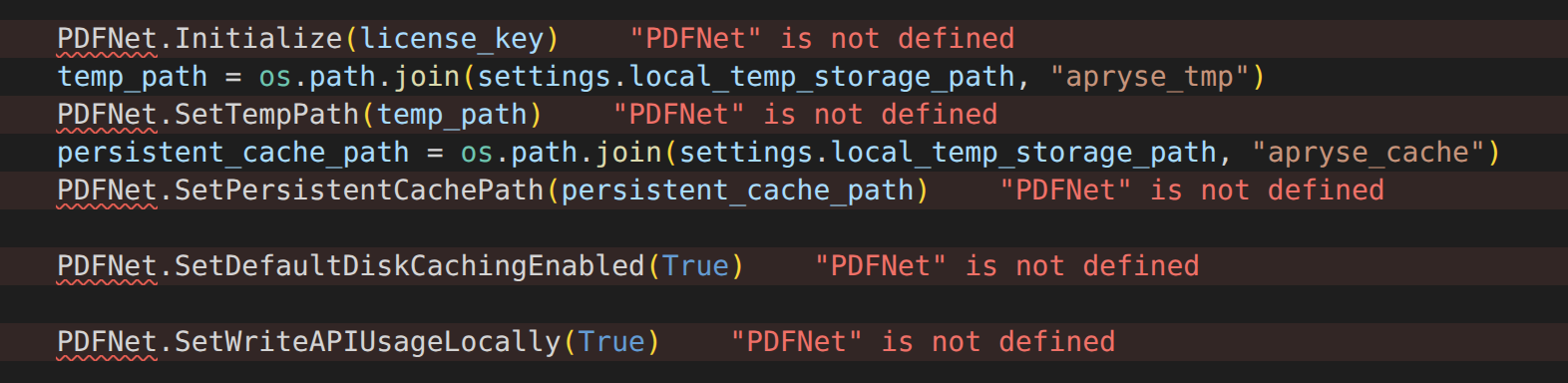
Please give a brief summary of your issue:
How to use Apryse SDK for Python in vscode with PyLance as intellisense
Please describe your issue and provide steps to reproduce it:
I am working on a python project and using vscode as ide for the development environment.
However, I have quite some trouble to get the Pylance extension to accept the Apryse SDK references, it keeps adding orange and red underlines to say it cannot find the type, e.g. PDFNet.something and any other imports from apryse_sdk.
Please point me in the direction of how to setup vscode to be able to autocomplete and lint the code and proper help on the parameters etc while using the apryse_sdk for python.
Hello, I’m AiRon, an automated tech support bot While you wait for one of our customer support representatives, I can help you with your question.
It seems like you’re facing an issue with getting the IntelliSense feature of the PyLance extension in Visual Studio Code to recognize the Apryse SDK for Python. This is a common issue when using third-party libraries that may not have type stubs or .pyi files that Pylance can easily read.
Some things you can try:
Ensure the Apryse SDK is correctly installed in your Python environment used by VSCode. You can verify this by running pip list in the terminal within VSCode.
Check if your Python interpreter is set correctly in VSCode. You can do this by clicking on the Python version displayed in the bottom left corner of VSCode and selecting the correct interpreter.
Consider creating a typings folder in your project root and adding a pyi file for the Apryse SDK, where you can manually add type stubs for the functions you are using.
Make sure that the Pylance extension is correctly configured to use the Python environment where the Apryse SDK is installed.
Reload your VSCode window after making changes to the interpreter or environment to ensure all settings are applied.
The first thing I would recommend is trying to run one of our samples that come with the download using VSCode without PyLance or just the Python IDLE and seeing if it runs correctly. This will help determine if the base issue is with the library not being properly set-up or if the issue is elsewhere.
If the samples fail and the library is not set-up correctly, I would recommend following our guide here if you haven’t and let me know if you have any issues or failures anywhere:
If the samples pass, then the issue is likely due to PyLance. Unfortunately, we won’t be able to help debug PyLance issues, but some searching brings up this SO post where the post comment seems to have some helpful solutions:
Specifically, #2, you might need to be adding the Apryse module to your setting.json.