WebViewer Version: 11.13; 12.0.1
Do you have an issue with a specific file(s)?
No, appears to happen on every file with a multiline Form Field.
Can you reproduce using one of our samples or online demos?
Yes, i can reproduce the problem on https://showcase.apryse.com
Are you using the WebViewer server?
No
Does the issue only happen on certain browsers?
Safari on iOS and MacOS; Edge on Windows is working fine.
Is your issue related to a front-end framework?
No
Is your issue related to annotations?
Form Fields
**Please give a brief summary of your issue: **
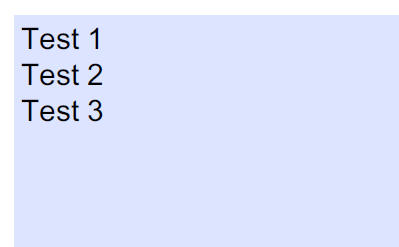
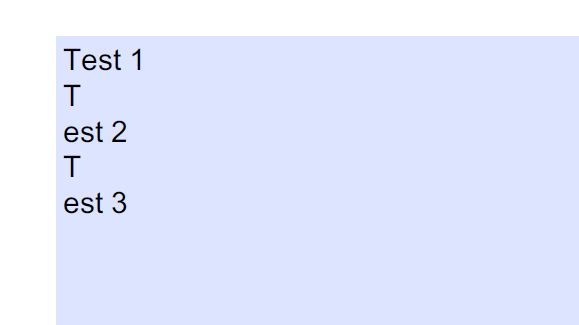
As soon as we have a multiline form field within our PDF and a user is adding more than one line, after each first charakter after the first line (second line and ongoing) a line break is added.
Expectation after editing (Screenshot from Edited Windows.pdf):
Actual rendering after editing (Screenshot from Edited iPad.pdf):
Please describe your issue and provide steps to reproduce it:
- Go to https://showcase.apryse.com with MacOS or iPad
- Select
Form Fillingas Features to test - Choose the attached
Original.pdffor editing - Now write the following in the form field:
Test 1
Test 2
Test 3
- Select “Download” via the Menu
- Now the representation in the browser looks right (i think safari is rendering the appearance for itself in this case); but it isnt!
- Download the file or send it via EMail to a Desktop PC and Open the file - as you can see the appearance of the text is broken
Original.pdf (6.1 KB)
Edited iPad.pdf (10.4 KB)
Edited Windows.pdf (10.4 KB)