Do you have an issue with a specific file(s)?
Can you reproduce using one of our samples or online demos?
no
Are you using the WebViewer server?
no
Does the issue only happen on certain browsers?
no
Is your issue related to a front-end framework?
no
Is your issue related to annotations?
yes
Please give a brief summary of your issue:
I want to programmatically highlight text on a page in the doc (I do not want to create a permanent annotation)
(which works and shows the markers on the document)
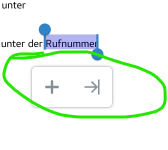
i would expect the textPopup to be visible which shows when manually selecting text using the cursor. However this popup does not show.
Now, if I try to force it open using instance.UI.openElements(['textPopup']); the editor will crash, cause it doesn’t know where to show the popup (is what i am guessing)
Hello, I’m AiRon, an automated tech support bot While you wait for one of our customer support representatives, I can help you with your question.
It sounds like you’re trying to programmatically select text and display the text popup in WebViewer. The issue you’re encountering is that the text popup doesn’t automatically appear when text is selected programmatically using documentViewer.select(). This behavior is expected because the popup is typically triggered by user interaction.
Some things you can try:
Ensure you are using the correct method to trigger the text popup. The text popup is usually shown when text is selected by the user, so you’ll need to manually trigger it after programmatically selecting text.
After selecting the text programmatically, use the instance.UI.showTextPopup() method, which is designed to show the popup at a specified location. This avoids the crash caused by using instance.UI.openElements(['textPopup']) without context.
Ensure the coordinates for displaying the popup are properly calculated based on the selected text rectangle to avoid any rendering issues.
The manual text selection passes the location and quads of the selected text to the text popup element. By programatically selecting the text, there are no quads to pass as you have stated.
To provide a better solution to the issue, can you explain the workflow on why selecting text programatically is needed?
this was actually going to be a workaround to not have to deal with playwright mouse coordinates when selecting text in the document. Because while it works most of the time, we seem to have an issue where the popup does not open on first try…
Yes I was thinking missing quads may be the issue. I have the quads available though, I even tried to commit them using: