Product:
Apryse WebViewer
Product Version:
11.12.0
Please give a brief summary of your issue:
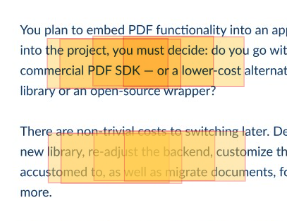
Overlapping RectangleAnnotations cause opacity stacking and make underlying text unreadable
Please describe your issue and provide steps to reproduce it:
We are using RectangleAnnotation to render bounding boxes (geo-tagged highlights) on top of PDF documents.
When multiple annotations overlap, their opacity stacks due to alpha compositing, resulting in progressively darker regions. After a few overlaps, the underlying text becomes difficult or impossible to read.
Implementation details:
rect.FillColor = new Annotations.Color(255, 255, 0, 1);
rect.Opacity = 0.5;
Annotations are added using:
annotationManager.addAnnotation(rect);
annotationManager.redrawAnnotation(rect);
Steps to reproduce:
-
Load a PDF document
-
Add multiple
RectangleAnnotations with the same color and opacity -
Position them so they overlap (~80% overlap in our case)
-
Observe that overlapping regions become significantly darker
-
Text beneath overlapping areas becomes faded/blurred and unreadable
Key observation:
-
RectangleAnnotationuses standard alpha compositing, leading to opacity stacking -
TextHighlightAnnotation(created via UI/manual highlight) does not exhibit this behavior and maintains consistent visual opacity
Please provide a link to a minimal sample where the issue is reproducible:
https://github.com/sarthak-jktech/Overlapping-PDF-Annotations