type error cannot read properties of null reading document angular
1 Like
Hello, I’m AiRon, an automated tech support bot 
While you wait for one of our customer support representatives, I can help you with your question.
It seems like you’re encountering an issue where saving an annotation in a PDF isn’t working, and you’re receiving a “TypeError: Cannot read properties of null (reading ‘document’)” error. This typically occurs when the document object is not properly initialized or is being accessed before it’s available.
Some things you can try:
- Ensure that the document is fully loaded before attempting to save annotations. You can use the
documentLoadedevent to check when the document is ready. - Verify that your code is correctly accessing the document object. It might be trying to access it at a point where it hasn’t been initialized yet.
- Check if there are any asynchronous operations that might affect the state of the document. Use proper error handling to catch and debug such issues.
- Review the logic where you apply or save annotations to ensure the document object is not null at the time of execution.
Here are some resources that might help you:
- Open a Document - This guide explains how to properly load a document and handle loading events.
- Custom PDF Annotation Appearances - Learn about handling annotations and ensuring they are applied correctly.
- UI Import and Export - Understand how to manage UI components that might affect document handling.
- Angular PDF Library - WebViewer Get Started - This guide will help you ensure your Angular setup is correct for using WebViewer.
Hopefully, this helps you solve your problem while you wait for a human to get back to you.
1 Like
Hello Mahesh,
Thank you for contacting WebViewer Forums.
To investigate further, please provide the details below:
- Screenshots of the error in console
- WebViewer code snippets used to reproduce the error
- WebViewer version
Regards,
Luke
1 Like
Below code is throwing null exception as this.Xp.document is null in webviewer-core.min.js
this.ul = document.createElement(“iframe”);
this.ul.style.height = “0px”;
this.ul.style.width = “0px”;
this.ul.style.borderWidth = “0px”;
this.ul.title = “jsenabled”;
document.body.appendChild(this.ul);
this.Xp = this.ul.contentWindow;
var Na = this.Xp.document;
1 Like
Hello Mahesh,
Thank you for your reply.
Are you looking to access the minified properties of the document? Currently this is not possible as it is minified. To access the DOM elements on the Iframe, please see this documentation here: Custom JavaScript PDF Viewer UI Style: Buttons, Panel, Modal | Apryse documentation
Regards,
Luke
1 Like
I am adding annotations, images and attachments. When I click on save button it’s throwing below exception. This exception is occurring rarely
• ERROR Error: Uncaught (in promise): TypeError: Cannot read properties of null (reeding “document”)
TypeError: Cannot read properties of null (reading “document”)
at new Ka (webvlexer-core.min. js:3979:113) at Va.Uia (uchvicwer-corc.min,is:4924:472)
at new pa (webviexer-cone.nin.js:280:147)
at webviewer-core.min.js: 769:334 at n (nebydewer-cone.nin.js:65:39)
et Object.next (usbvicwer-corc.nin.js:63:329)
at f (wchvicusr-corc.nin, js:63:96)
at new Ka (webviener-cone.min.js:3979:113) et Va.Uia (nebviewer-core.min.js:4024:473)
at new pa (webviexer-coce.nin,js:230:147)
at webvicwen-core.min.js:789:334
1 Like
Steps to reproduce the issue
Initial save worked fine
1.Initial Save
2.added 2 Reference Link & saved
3.Added 10 Reference Link & saved
4.Added 10 Reference Link & saved
5.Added 10 Reference Link & saved
6.Added 10 Reference Link & saved
7.Added 10 Reference Link & saved
8.Added 10 Reference Link & saved
9.Added 10 Reference Link & saved - ERROR
Error detail is
ERROR Error: Uncaught (in promise): TypeError: Cannot read properties of null (reeding “document”)
TypeError: Cannot read properties of null (reading “document”)
Webviewer version which we are using is 10.6.0
1 Like
Could you please help on this. Application is failing because of this production issue
1 Like
Hello Mahesh,
If you can provide a video demo of the issue, that would greatly help understand the current workflow of your application and the error. We are looking to reproduce this issue with our 10.6 environment so any clarity would be appreciated. Please see below the following questions:
-
“Added Reference Link,” what type of annotations are these?
-
On pressing “save,” is this a custom button? What code is running when you press this button - is this calling exportAnnotations() or getFileData() in any way?
Regards,
Luke
1 Like
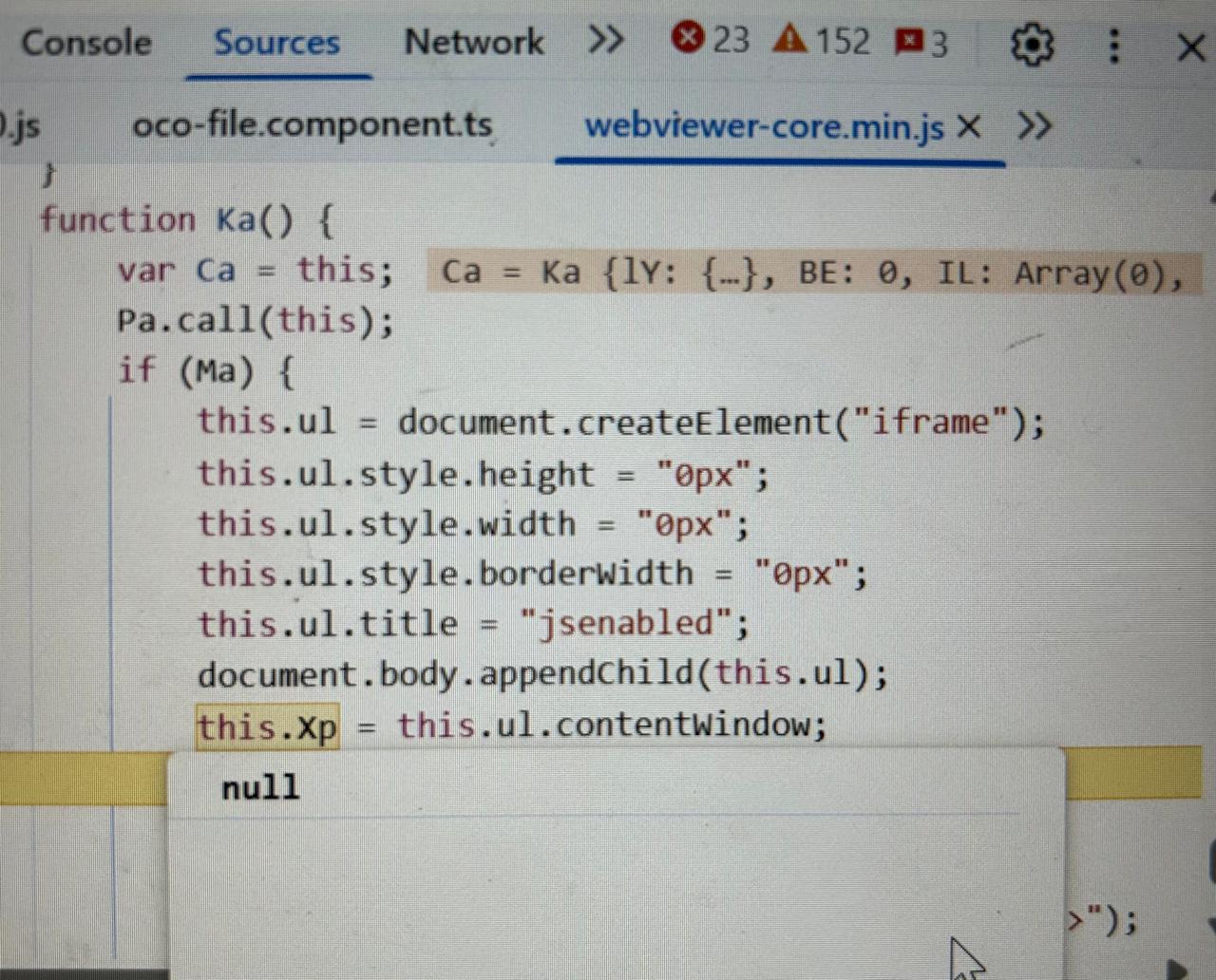
any help on this? initially it’s working fine. But when annotation count increase above 100 it’s throwing exception on inbuilt javascript as shown above screenshot. exportAnnotations() method is throwing this error
1 Like
Hello Mahesh,
Thank you for your reply.
As mentioned previously, we are unsure of the issue unless more information is provided. To re-iterate, can you provide a quick demo video showcasing “adding 100 annotations” and the save button throwing the exception?
Please also provide the code used on saving the annotations as well a sample file where the issue is reproducible.
Regards,
Luke
1 Like