WebViewer Version: 11.10.0
Do you have an issue with a specific file(s)?
No, happens with any PDF file.
Can you reproduce using one of our samples or online demos?
I haven’t tested with the online demos yet, but reproduces consistently in my React app.
Are you using the WebViewer server?
No.
Does the issue only happen on certain browsers?
Tested on Chrome, confirmed issue there.
Is your issue related to a front-end framework?
Yes, I’m using React 17 with TypeScript.
Is your issue related to annotations?
No, just loading and closing PDFs repeatedly.
Please give a brief summary of your issue:
memory leak: around 20-25mb per PDF open never released.
Please describe your issue and provide steps to reproduce it:
I initialize WebViewer.Iframe once on component mount and the component unmounts/remounts each time a different PDF is opened. Each PDF open creates a new WebViewer instance with cleanup function, but memory heap grows by 20-25 mb when I open and never decreases even after I force garbage collection.
Steps to reproduce:
- Open PDF 1: heap = 70MB
- Close PDF (component unmounts, cleanup runs successfully)
- Open PDF 2 : heap = 95MB (+25MB)
- Close PDF (cleanup runs successfully)
- Open PDF 3: heap = 118MB (+23MB)
- Force garbage collection: heap stays at 118MB (no decrease, not returning to a normal baseline)
- If I continue : 141MB => 157MB => 175MB…
Network tab observation:
Every single PDF open triggers downloads:
- PDFNetC.wasm.br.wasm (around 2,734 kB)
- pdfnet.res (around 1,765 kB)
- webviewer-core.min.js
- webviewer-ui.min.js
- fonts, etc.
My implementation:
Component mounts/unmounts per PDF. I added this cleanup to see if it solved the memory leaks, but it didn’t:
useEffect(() => {
    let instance: WebViewerInstance | null = null;

    WebViewer.Iframe({
        path: "/webviewer/lib/", // it is coming from a s3 bucket
        licenseKey: "...",
    }, viewerRef.current).then((inst) => {
        ...
        instance = inst;
        setPDFTron(inst);
    });

     return () => {
            if (instance) {
                try {
                    const { UI, Core } = instance;

                    const documentViewer = Core.documentViewer;
                    if (documentViewer) {
                        documentViewer.closeDocument();
                    }

                    UI.dispose();

                } catch (error) {
                    console.error("Error disposing PDFTron:", error);
                } finally {
                    instance = null;
                }
            }

            if (documentRef.current) {
                documentRef.current = null;
            }

            setPDFTron(null);

            if (viewerRef.current) {
                viewerRef.current.innerHTML = '';
            }
        };
}, []);
Here I kept opening and closing a the same pdf repeatedly. The heap size keeps growing over time.
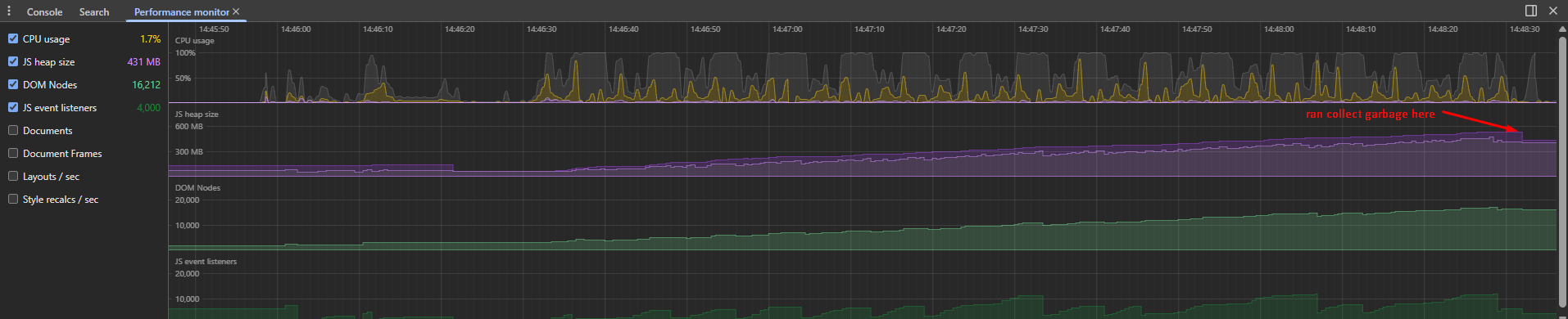
Cleanup function is confirmed working via logs, but memory is never released for some reason. Is there additional cleanup needed other than closeDocument() and UI.dispose()? Are there known memory leak issues in version 11.10.0 with this mount/unmount pattern? I upgraded to version 11.10.0 but it didn’t solve the problem.
