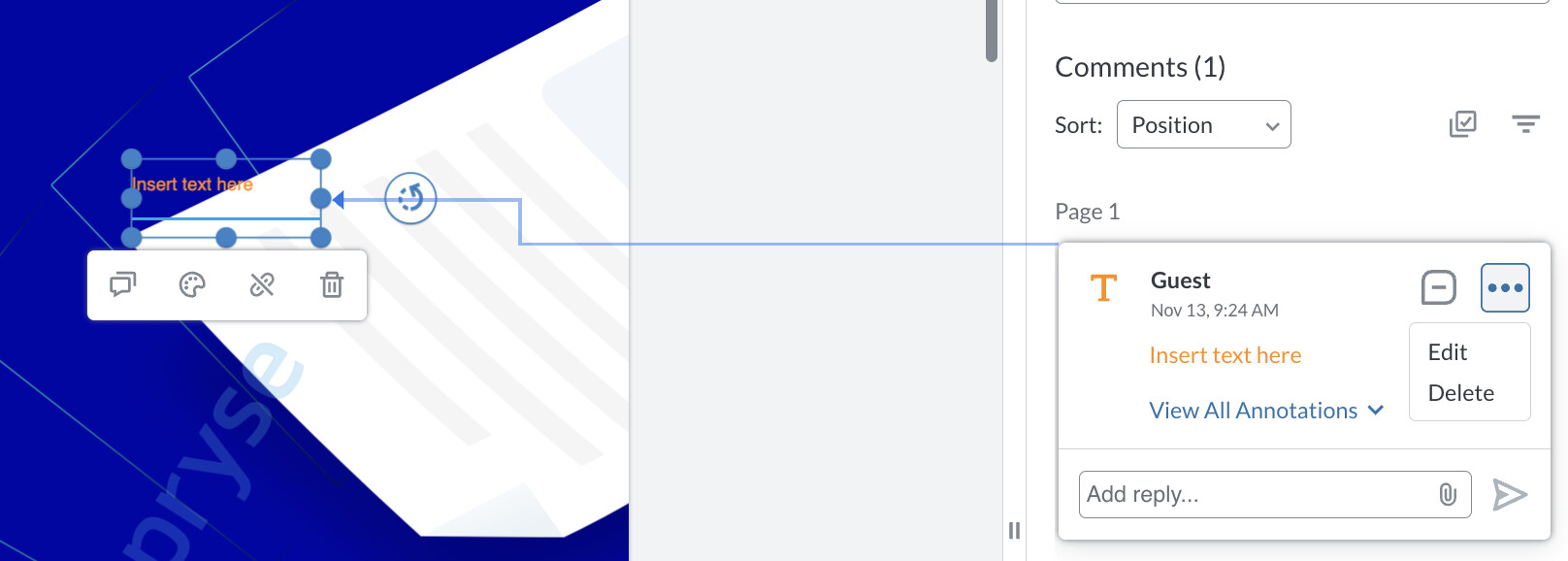
Please give a brief summary of your issue:
Difficulty deleting free text annotations with attached links — need a simpler, more intuitive way to remove references.
Please describe your issue and provide steps to reproduce it:
When a free text annotation has a link attached to it, it’s not easy to delete the reference. Currently, users need to manually open the annotation or go through multiple steps to remove the link and then delete the reference.
Steps to reproduce:
Create a free text annotation.
Attach a link/reference to the annotation.
Try to delete the reference directly from the viewer.
Expected behaviour:
It should be easier and more intuitive to delete the reference (e.g., via a visible delete button when hovering over the annotation).
Please provide a link to a minimal sample where the issue is reproducible:
The issue can be reproduced in any standard Apryse WebViewer setup using Free Text Annotations with link attachments.
Hello, I’m AiRon, an automated tech support bot While you wait for one of our customer support representatives, I can help you with your question.
It sounds like you’re trying to improve the user experience by adding a delete button that appears on hover for free text annotations with links in Apryse’s WebViewer. This feature isn’t available out-of-the-box, but you can achieve it by customizing the viewer’s UI and handling events to show a delete button when hovering over annotations.
Some things you can try:
Use the mouseOver event on annotations to detect when a user hovers over an annotation.
Create a custom button element that appears next to the annotation when it is hovered over.
Attach a click event to the button to handle the deletion of the annotation or its link.
Ensure that the button is styled and positioned correctly relative to the annotation.
Here are some resources that might help you:
Creating Annotations - Learn about creating and managing annotations, which can guide you in customizing annotation interactions.
FreeText & Callout Annotations - Understand the specifics of free text annotations that might help in customizing their behavior.
Getting Text from Text Select Events - This guide can help you understand how to interact with text selections, which is useful for managing annotation interactions.
RTL Language Support - If you are dealing with RTL languages, this guide can assist in ensuring compatibility when customizing annotations.
Hopefully, this helps you solve your problem while you wait for a human to get back to you.
I think deleting the link associated to an annotation is quite simple. If you hover over a free text with a link there should be a delete button. How are you currently deleting the link?
Apologies for missing that detail. We don’t have an API to add a button to that popup currently. If you want to delete both at the same time, you can do this in the notes panel.