Please give a brief summary of your issue:
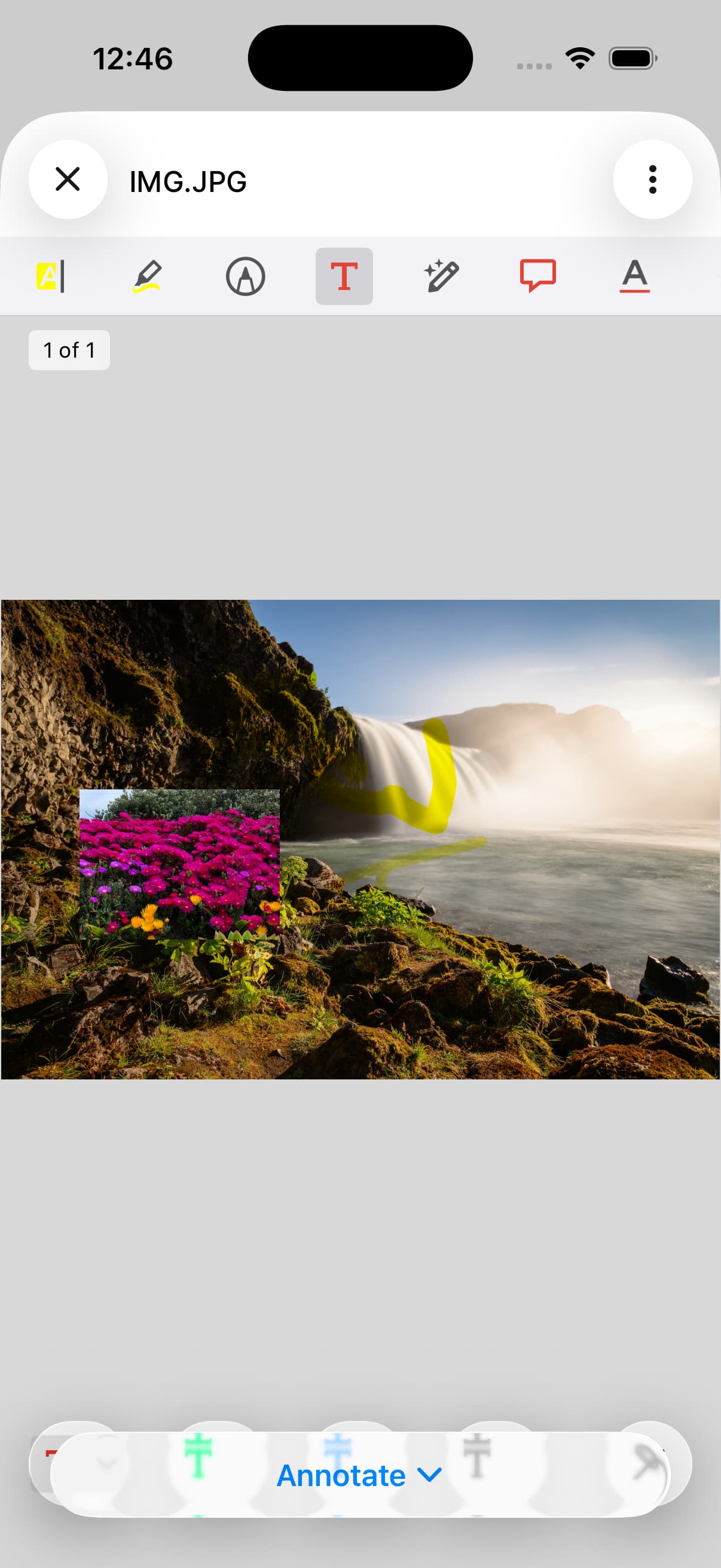
With the iOS 26 updates the new UI of the tool group tool bar covers the selection. If you switch to annotate or shapesand then select one the tool bar will cover the options.
Please describe your issue and provide steps to reproduce it:
(The more descriptive your answer, the faster we are able to help you)
I know I can move the toolGroupToolbar up but I feel like the SDK should handle this. I’ve attached an image where oyu can see I’ve selected the textbox in annotate but all the color options are behind it. This is not an issue in iOS 18.
Hello, I’m AiRon, an automated tech support bot While you wait for one of our customer support representatives, I can help you with your question.
It seems that you are experiencing an issue with the toolGroupToolbar in the Apryse iOS SDK where it overlaps with the selection options when switching to annotate or shape tools. This is likely due to changes in the UI handling in the latest iOS updates.
Some things you can try:
Check if there are any methods in the Apryse SDK that allow you to customize the position or behavior of the toolGroupToolbar.
Consider using the SDK’s delegate methods to adjust the UI elements programmatically when the toolbar is displayed.
Investigate if there is a property or method to adjust the layout of the toolGroupToolbar to avoid overlapping with other UI elements.
Thank you for reaching out through our Forum. In order to best assist you, would you be able to submit a minimal runnable sample project through a support ticket through this link: Submit a ticket : Apryse
We’ll be able to more appropriately support you through that end. I look forward to your response.