Please give a brief summary of your issue:
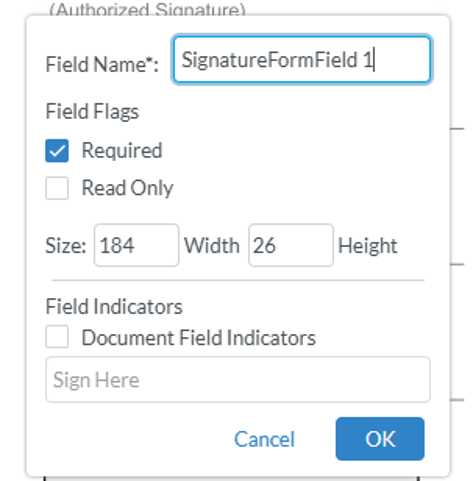
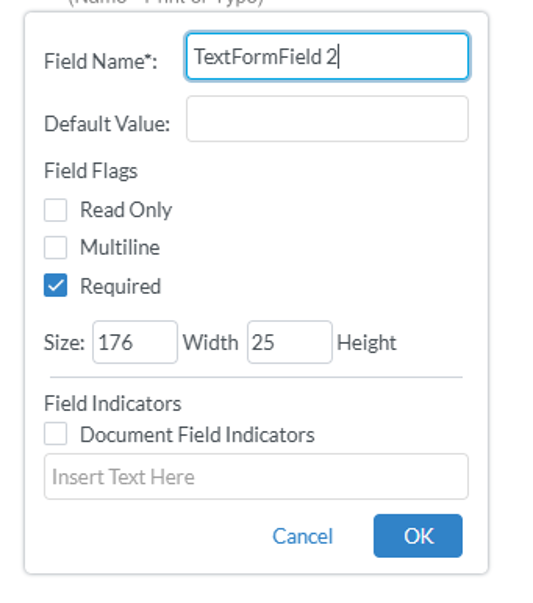
The order of fields in Webviewer is inconsistent—Signature fields and Text fields have different ordering for “Required” and “Read Only,” which needs to be aligned.
Please describe your issue and provide steps to reproduce it:
In Webviewer, the ordering of options under Signature Field and Text Field is inconsistent. For Signature Field, “Required” appears before “Read Only,” whereas for Text Field, “Read Only” appears before “Required.”
This behavior is related to the legacy UI, which has been officially deprecated since last fall. The issue you are experiencing has already been addressed in the modular UI, which is the current supported interface.
Please note that the legacy UI is scheduled for removal in version 12 (July release), and it will no longer receive fixes or updates going forward. For this reason, we strongly recommend migrating to the modular UI as soon as possible to ensure continued support, stability, and access to the latest improvements.
If upgrading to Webviewer version 11 is currently not possible for you, you can switch to the modular UI by specifying in your Webviewer Constructor:
ui: ‘beta,
I invite you to read this guide about migrating from legacy to modular UI: