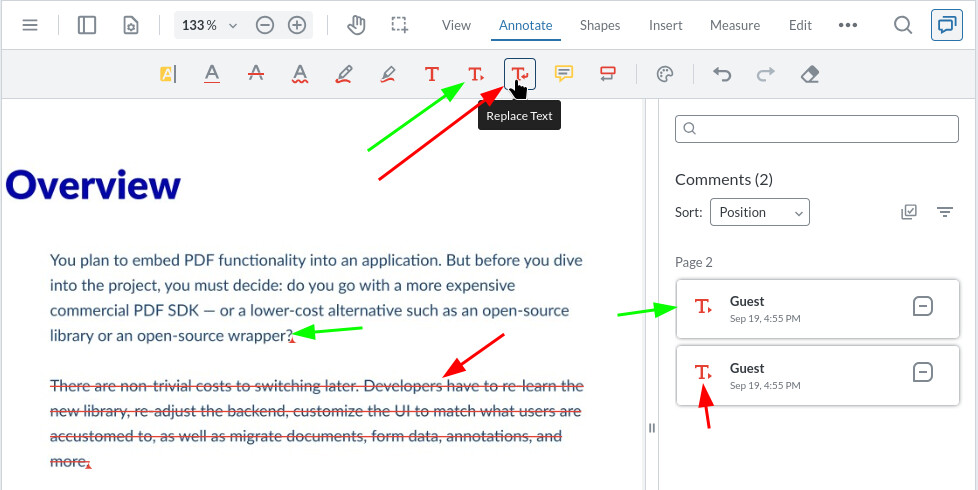
This is a minor issue.
In the WebViewer, the icon displayed in the Comments sidebar for the Replace Text annotation is incorrect. The expected Replace Text icon is not shown; instead, the Insert Text icon (the red arrow symbol) appears. The Insert Text annotation itself functions correctly.
Hello, I’m AiRon, an automated tech support bot While you wait for one of our customer support representatives, I can help you with your question.
It seems that you’ve encountered an issue with the icon representation for the Replace Text annotation in Apryse’s WebViewer. This could be a minor bug or misconfiguration in the icon set used by the Comments sidebar.
Some things you can try:
Ensure that the WebViewer is properly updated to the latest version, as sometimes these issues are resolved in subsequent patches or updates.
Check the configuration files or settings related to the annotation icons. There might be a custom setting that needs adjustment.
Look into the WebViewer’s customization options to see if you can manually set or override the icon for specific annotations.
Here are some resources that might help you:
Annotations Guide - Learn how to customize annotations in WebViewer.
UI Customization - Explore how to customize the user interface, including icons and annotations.
Configuration Files - Understand how to manage and modify configuration settings.
Release Notes - Check for any updates or fixes related to your issue in recent releases.
Hopefully, this helps you solve your problem while you wait for a human to get back to you.