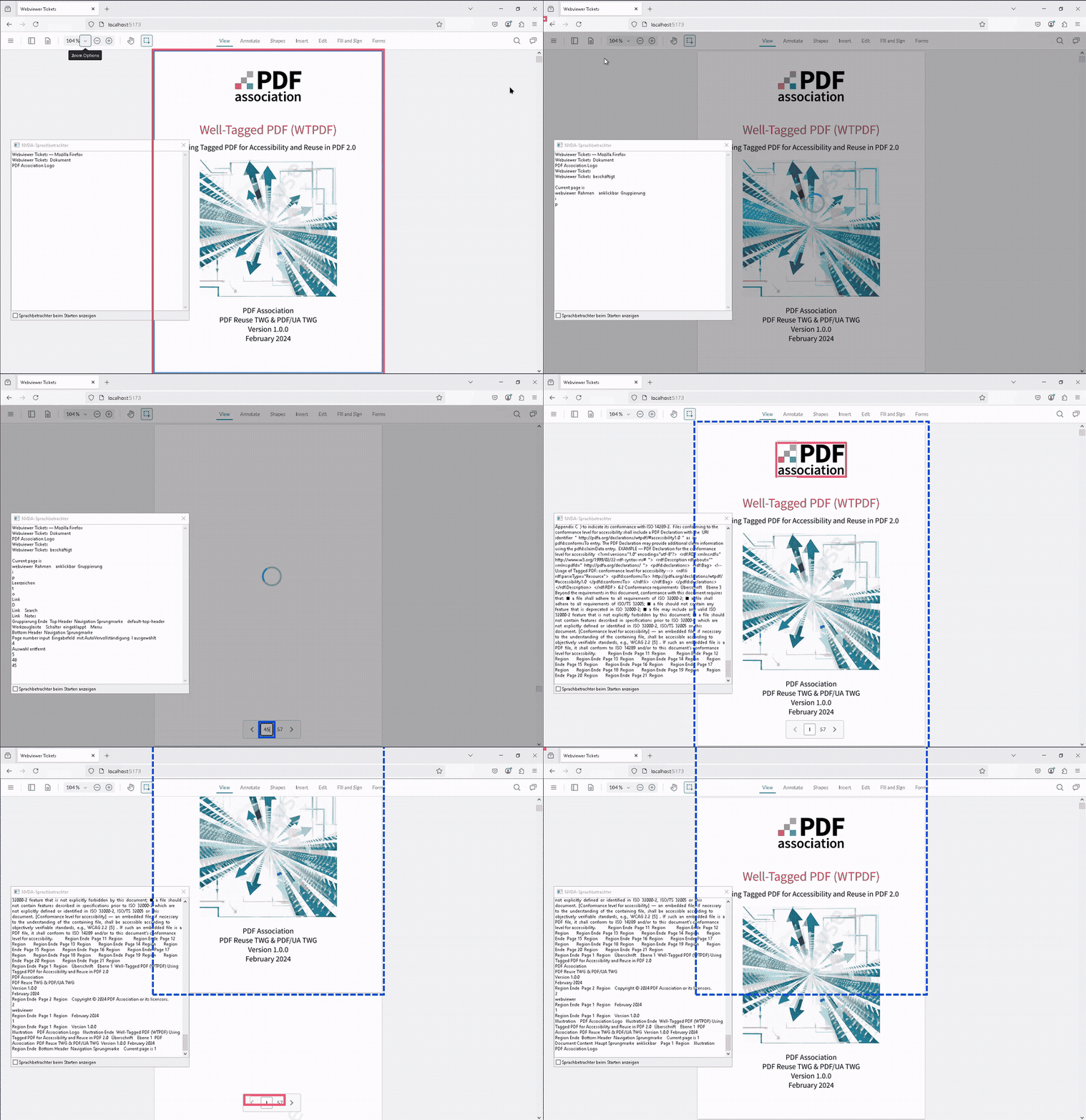
I am using the accessibility functionality of the Webviewer (11.4.0) and I am looking for an event that shows me that the PreProcessing process of the AccessibleReadingOrderManager has been completed.
I have already checked the events of the AccessibleReadingOrderManager. However, these only seem to trigger when the PreProcessing is started, but not when it is finished.
Is there a way to track this status?
Update
Sorry, i just checked the github project and find the accessibleReadingOrderModeReady. Can you add this to your documentation?
Hello, I’m AiRon, an automated tech support bot While you wait for one of our customer support representatives, I can help you with your question.
It seems you’re trying to determine when the preprocessing step of the AccessibleReadingOrderManager has been completed in WebViewer. This is important for ensuring that accessibility features are fully initialized before performing further actions.
Some things you can try:
Check if there is a specific event or callback function in the AccessibleReadingOrderManager documentation that can be used to determine when preprocessing is completed.
Consider using a workaround by polling the status of the manager to check if preprocessing is complete, although this is not the most efficient solution.
Review the latest WebViewer API documentation for any updates or newly added events that might address your requirement.
Explore the possibilities of integrating custom events or promises that can be resolved once preprocessing is detected as complete through indirect means.
Here are some resources that might help you:
Accessibility Guide - Provides an overview of accessibility features and might contain relevant information about preprocessing events.
WebViewer API Documentation - Check for specific methods and events related to the AccessibleReadingOrderManager.
Customization Guide - Offers insights on customizing WebViewer, which may include handling events.
I had a strange behavior of the accessibleReadingOrderModeReady event. With bigger documents, this event will be fired multiple times but without additional information.
this case is not reproducible with the showcase. I use the AccessibleReadingOrderManager to detect, if the Accessibility Layer is available.
This is relevant because users who use screen readers such as NVDA do not receive any feedback in my tests that the loading process of the accessibility layer has not yet loaded. Although an animation is displayed, this does not generate any output in my tests.
I use these events to implement the corresponding outputs. I noticed that one event exists, but does not appear in the documentation or the Typescript library.
I also noticed the second point with the multiple calls in this context.
Maybe, this is related to this ticket that I also opened:
The product team reviewed the accessibleReadingOrderModeReady event and has notified me that this event is used internally and not exposed on purpose. It may trigger multiple times which is expected.
Regarding this API usage, could you please clarify what your use-case or your objective is with this event? We may consider formally exposing or creating a new event depending on the use-case.
one of the current problems is, that the Accessibility Layer has it own loading animation, but did not trigger any message in the Screenreader. For Screenreaders, there must be, for example, an element with the role=“alert” and aria-busy=“true”.
There is also the point, that the accessibility layer seems to be loaded async, so further pages will be rendered later. So the screenreader users can lose the orientation if they reach a non-rendered page.
I think it can be helpful to render an information layer on pages, that are not rendered at the moment. I hoped to solve this problem temporary with events like this.