WebViewer Version: 11.10
Do you have an issue with a specific file(s)? Yes
Please give a brief summary of your issue: Not at specific Docx Generation
Please describe your issue and provide steps to reproduce it:
   const reportDoc = await createDocument(file, {
            filename: fileName,
            extension: fileType,
            officeOptions: {
              formatOptions: {
                displayChangeTracking: false,
              },
            },
          });

          await reportDoc.applyTemplateValues(reportData);
   //Stopping from the top

          await documentViewer.loadDocument(reportDoc, {});
Apryse_오류docx_sample.docx (117.7 KB)
Demo also loads the file and loads it indefinitely when running the Fill Template.
Please provide a link to a minimal sample where the issue is reproducible:
Hi Rlaks,
Thank you for reaching out.
Can you please provide the reportData you’re using to fill the template?
I see you are using version 11.10. Have you tested the latest version locally to see if that resolves the issue?
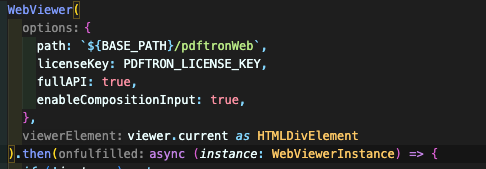
Can you provide a code snippet of the Webviewer constructor and options?
Do you have any console errors? If so, please provide a screenshot.
Let us know if you have any questions.
Best Regards,
Thank you for your cooperation.
Can you please provide the reportData you’re using to fill the template?
{}
I’m using an empty object.
{DOC_TITLE: “TEST”}
Even if you add a value, the symptoms are the same.
I see you are using version 11.10. Have you tested the latest version locally to see if that resolves the issue?
Isn’t the Demo version the latest? Not even Demo.
Can you provide a code snippet of the Webviewer constructor and options?
Do you have any console errors? If so, please provide a screenshot.
Console does not have any errors.
Regards,
Hi Rlaks,
Thank you for your reply.
Trying out on the Showcase seems to be working for me:
I’m loading the provided template file
Executing this code:
const instance = window.WebViewer.getInstance()
const {
    UI,
    Core
} = instance;
const {
    Actions,
    documentViewer,
    Annotations,
    annotationManager,
    AnnotationManager,
    PDFNet,
    Tools
    } = Core

const doc = documentViewer.getDocument();

await doc.applyTemplateValues({
})

await doc.applyTemplateValues({
    "DOC_TITLE": "test",
})

await doc.applyTemplateValues({
    "DOC_TITLE": "test 2",
})
No indefinite loads of any sort. Maybe the issue was coming from:
rlaks5757:
{DOC_TITLE: “TEST”}
Since the DOC_TITLE was not set as a string using double quotes?
Let us know if you have any questions.Apryse_오류docx_sample.docx.pdf (582.5 KB)
Best Regards,
Thank you for your cooperation.
    const reportDoc = await createDocument(file, {
            filename: fileName,
            extension: fileType,
            officeOptions: {
              formatOptions: {
                displayChangeTracking: false,
              },
            },
          });

          await reportDoc.applyTemplateValues(reportData);

          await documentViewer.loadDocument(reportDoc, {});
Can I load normally even if I use it as above?
May I also know the reason why there is infinite loading when I upload the file in Demo’s Docx Generation and fill template?
Regards,
Hi Rlaks,
Thank you for your reply.
If you want to generate the document based on the template before loading the file in the viewer, I invite you to follow this guide:
The following are a series of real examples, generated using the code above. For each example, the template source and the json data source are included below, so that you can try them out yourself. | Here is your guide explaining how to generate...
Otherwise, first load the document and then use applyTemplateValues on the loaded document.
Best Regards,
Thank you for your cooperation.
Apryse_오류docx_sample 복사본.docx (94.1 KB)
There’s no problem with the above file
Only that file has a problem.
And I’m currently using the WebViewer SDK.
Regards,
Hi Rlaks,
I’m sorry, but I don’t understand what you’re asking here.
Could you clarify what you mean?
Best Regards,
Thank you for your cooperation.
For files with fewer pages, there’s nothing unusual about using them as they are. However, if you use files with many pages, they don’t work as I said before. This is the same with Document Generation using Text/Image Template With JS Demo | Apryse WebViewer .
Regards,
Hi Rlaks,
I’m attaching the sample project I’ve for this ticket.
Creating the document, applying the JSON value on the template, and then loading the file on Webviewer, and it is working fine.
Let me know if you see something significantly different176223.zip (411.8 KB)
Best Regards,