Product: PDFTron.NET.x64 c# package
Product Version: 11.8.1
Please give a brief summary of your issue:
We are facing formatting issues when converting Microsoft Word documents containing content controls (form fields) to PDF using PDFTron’s OfficeToPDF conversion.
The Word document renders correctly in Microsoft Word, but the formatting changes after conversion to PDF.
Issues Observed
When the content is inside content controls, the following issues occur in the generated PDF:
-
Font size is reduced
-
Font family changes (font substitution occurs)
-
Extra/unexpected text is displayed
All of the above issues are observed only for text inside content controls. Static text outside content controls is rendered correctly.
Code Snippet Used for Conversion
pdftron.PDF.Convert.OfficeToPDF(doc, filePath, null);

doc.Save(outputPath, SDFDoc.SaveOptions.e_linearized);
Hi Priya,
We are going to need to have the .docx file that you are converting so that we can test with it on our end. I have reached out to your supplied email address directly so please respond back to that on the existing ticket with the file that you are having these issues with.
-Christopher Thompson,
Apryse Support Engineer
Sure, I have attached a zip file with 5 sample files.
There are 4 folders inside the zip file
- Sample docx files
- Docx files converted to pdf using Save as option is ms word
- Docx files converted to pdf using Apryse
- Images depicting the format changes post conversion
Sample files.zip (3.1 MB)
Hi,
Is there any update on this?
Maybe I can highlight one of the samples
Filename - CN-000000002_A_009_Umbrella Cover Page.DOCX
Left side is the pdf converted using Apryse and right side is the original word document
The highlighted text visible in the PDF is not present in the original Word document.
Similarly, the font of the text “Test Calculation Note” also looks different.
Thanks
Hi Priya,
Currently we are working on testing your provided files with the latest available version of the Apryse toolkit to see if any of the issues that you are reporting have already been addressed. Based on some preliminary testing, I can say that some of these things appear to have already been addressed. As soon as I have more information for you, I will reach out with an additional update.
You have listed that you are working with the v11.8.1 version of the toolkit - can you please try upgrading to the currently available version of the toolkit, v11.12, to see if that resolves some, if not all of these issues?
-Christopher Thompson
Apryse Support Engineer
Hi Priya,
I have been able to test with the currently available version of the toolkit, v11.12, and found that a large number of these issues have already been resolved. Can you please try upgrading your library to the latest to see if there are any additional issues remaining? Once that has been done, if you see any lingering issues, please point those out and update your provided sample files/images.
Thanks
-Christopher Thompson,
Apryse Support Engineer
Hi,
I tried upgrading to 11.12 version but still the below issue is visible
Filename - CN-000000002_A_009_Umbrella Cover Page.DOCX
Left side is the pdf converted using Apryse and right side is the original word document
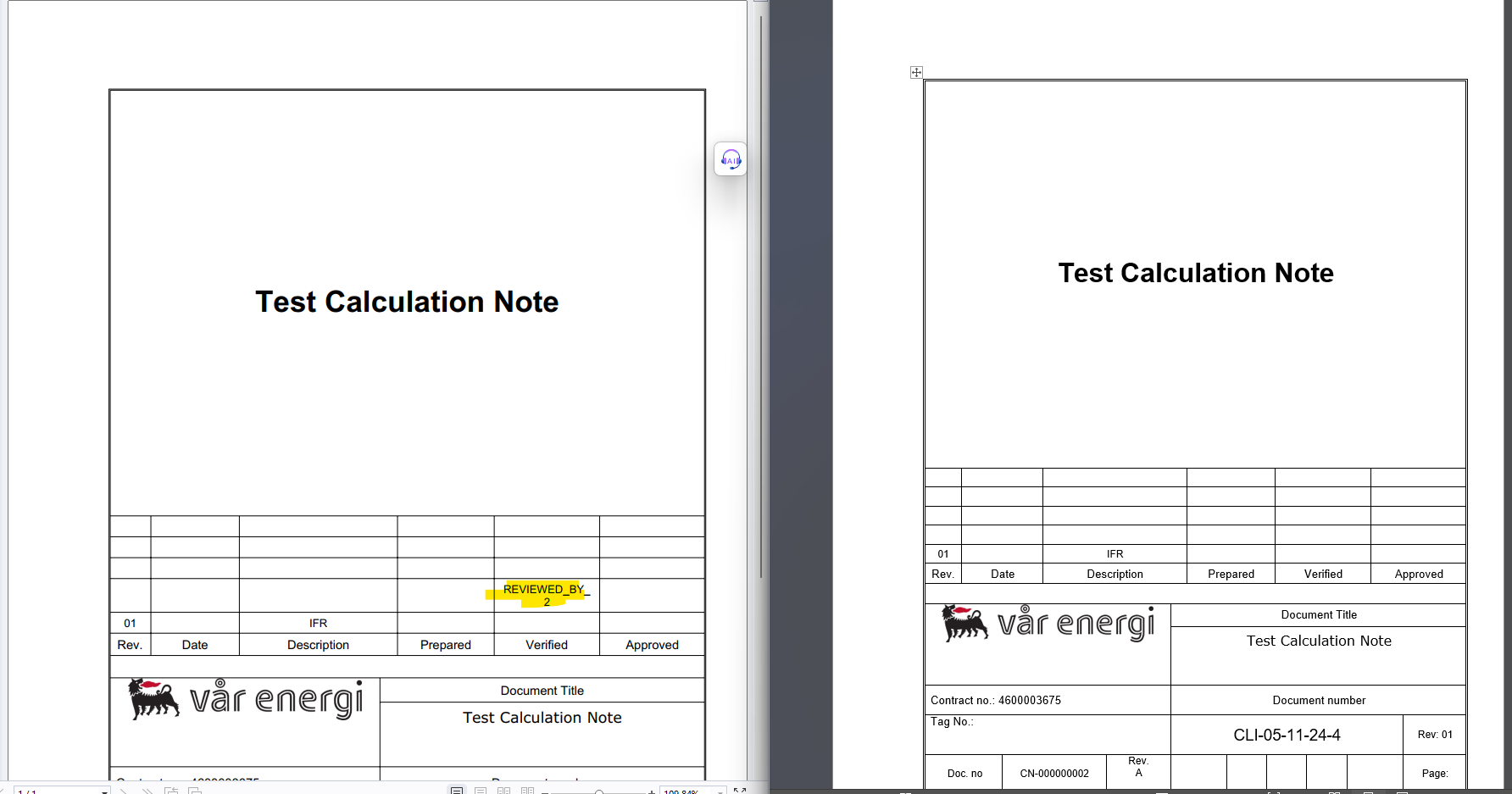
CN-000000002_A_009_Umbrella Cover Page.DOCX (193.1 KB)
The highlighted text visible in the PDF is not present in the original Word document.
Similarly, the font of the text “Test Calculation Note” also looks different.
Thanks
Hi Priya,
Thank you for testing the upgrade. I have also been able to replicate the issue you are seeing and have reported this to our Apryse Engineering Department. As soon as I get more information from them or a solution, I will reach out and update you.
Thanks,
-Christopher Thompson
Apryse Support Engineer
Hi,
Could you please let me know if there’s any update on the reported issue?
Thanks,
Priya
Hi,
One more issue is found in the attached word file where the highlighted text font size is reduced when converted to pdf file.
Filename - 0000-5454545454-SUP-ELLEN-EMAIL-001_06_002.DOCX
0000-5454545454-SUP-ELLEN-EMAIL-001_06_002.DOCX (269.1 K
Left side is the pdf converted using Apryse and right side is the original word document
Thanks,
Priya
Hi Priya,
No, we do not have an update for you at the moment regarding the originally submitted issue. Reported issues typically take some time to be investigated by our Apryse Engineering Department. As soon as we hear back from them regarding a solution or timeline we will be sure to update you.
Thank you for submitting this second file and the issue you are finding with it. I will need to create a separate ticket for you regarding that issue specifically for tracking purposes. I will reach out to you via email as soon as it has been submitted.
If you run across any additional issues with your files, it is often best to contact us via email at support@apryse.com. This allows us to track these issues and provide updates via email as they come.
Thanks,
-Christopher Thompson
Apryse Support Engineer
Hi Priya,
A solution for this issue has been found and incorporated into the upcoming released version of the Apryse Core SDK that is set to release on July 8th. I have tested this with our latest internal and it does appear to resolve the issue. Once the release occurs, you can update your libraries and test to make sure it works properly on your end as well.
To get notified for the next official SDK release you can join our Discourse Announcements channel.
https://community.apryse.com/t/about-the-announcements-category/3750
For platform specific notifications, such as Nuget, NPM, CocoaPods, please see the respective Apryse product documentation page.
https://docs.apryse.com/
Thanks,
-Christopher Thompson
Apryse Support Engineer
1 Like
