Please give a brief summary of your issue:
Text selection inconsistency in office document files (tested on .docx) - need alternative to loadAsPDF due to licensing requirements
Please describe your issue and provide steps to reproduce it:
Issue:
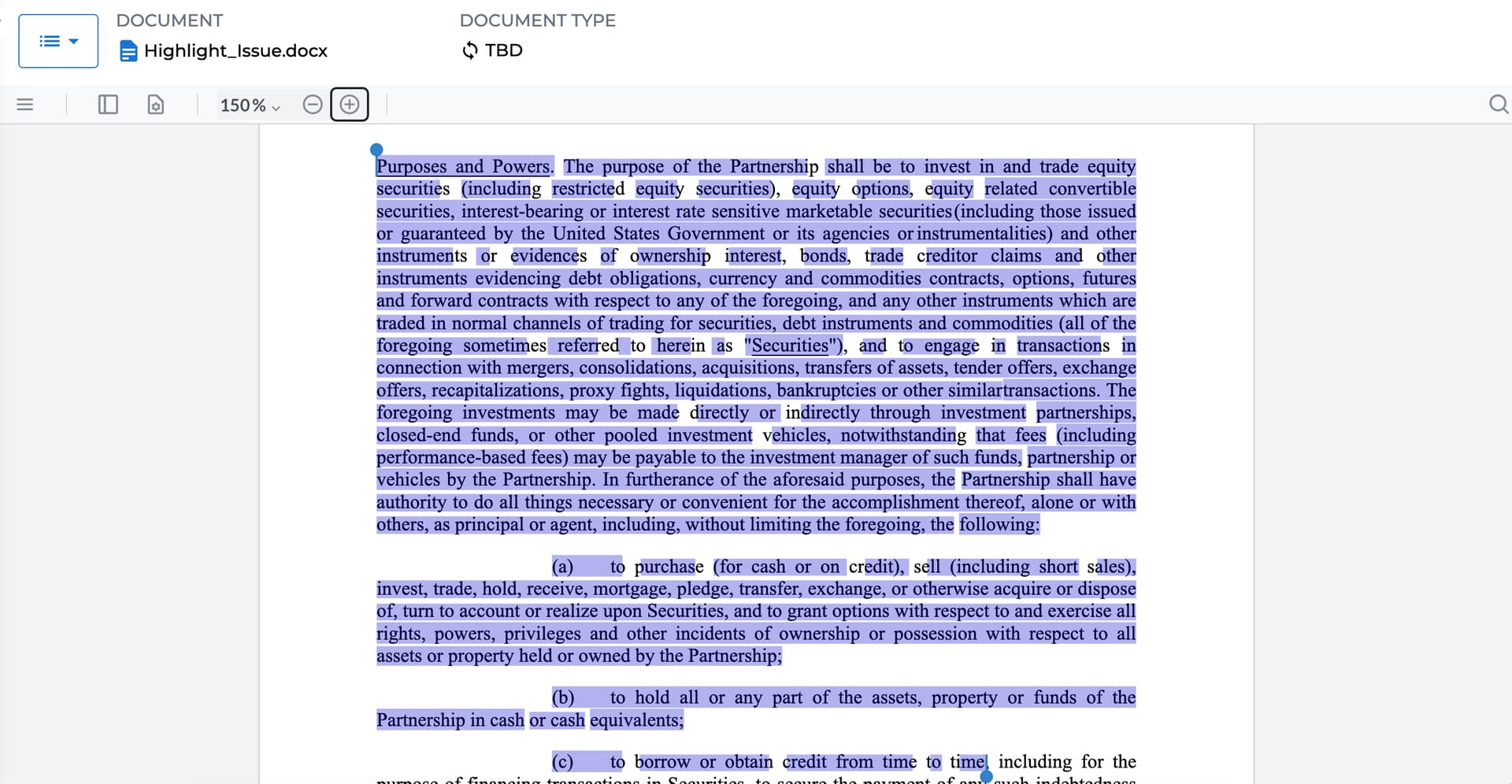
Text selection in document files is inconsistent. When selecting text, some characters are not highlighted and are missing from getSelectedText().
Current Workaround:
Setting loadAsPDF: true fixes the selection issue, but it requires additional licensing (Office add-on), which shows an Apryse watermark. We need a solution that works with our current WebViewer license.
Hello, I’m AiRon, an automated tech support bot While you wait for one of our customer support representatives, I can help you with your question.
It seems you’re experiencing issues with text selection in office documents using WebViewer without the loadAsPDF option. This is a common issue when the viewer is not able to correctly interpret the text layout of certain document formats, leading to inconsistent text highlighting and selection.
Some things you can try:
Consider using the latest version of WebViewer as improvements and bug fixes are continuously being made.
Ensure that the document is in a standard format and not corrupted, as non-standard formatting can affect text selection.
Check if there are specific fonts or styles used in the document that might not be fully supported by the viewer.
Explore the use of custom text extraction methods or modify the way text selection is handled through the API.
I’m already using the latest version. The issue I am facing has been long reported in this ticket - Text selection highlight is broken up - #3 by mark.aziz, however the workaround provided (loadAsPDF: true) in the ticket needs extra licensing which I want to avoid. I need a proper solution instead of a workaround.
Following your instructions, we were able to reproduce the behavior you were describing on our end. We are currently investigating the issue and we will reach out to you when we have an update.
Best Regards,
Jacob Romano Carlsen
Web Development Support Engineer Apryse Software Inc.
I would appreciate if I can get any tentative timeline for the resolution of this issue. As our customers are facing this issue very frequently and it is creating a bad impression of the product.
Our devs are still investigating the issue, but we have no current timeline until we get a better understanding of the cause. As soon as I hear back, I will let you know.
 While you wait for one of our customer support representatives, I can help you with your question.