Word Editor getTemplateKeys Error

WebViewer Version: 11.5.0

Do you have an issue with a specific file(s)?
Can you reproduce using one of our samples or online demos?
Are you using the WebViewer server?
Does the issue only happen on certain browsers?
Is your issue related to a front-end framework?
Is your issue related to annotations?

Please give a brief summary of your issue: Word Editor getTemplateKeys Error
(Think of this as an email subject)

Please describe your issue and provide steps to reproduce it:

(The more descriptive your answer, the faster we are able to help you)
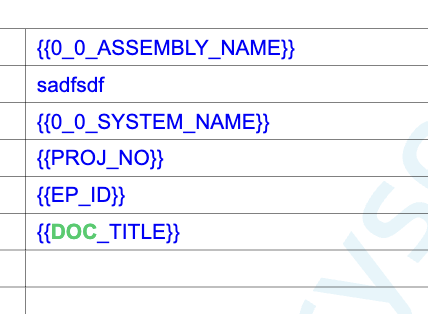
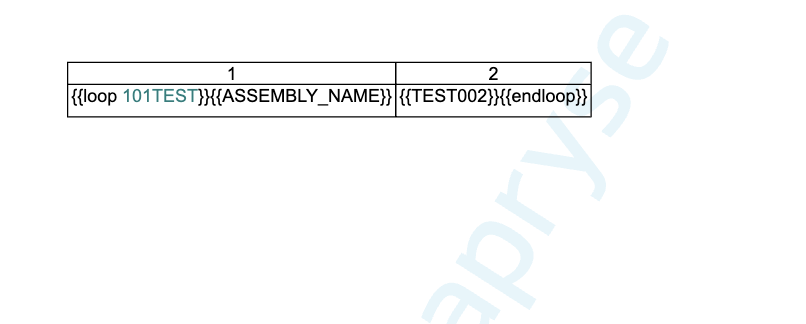
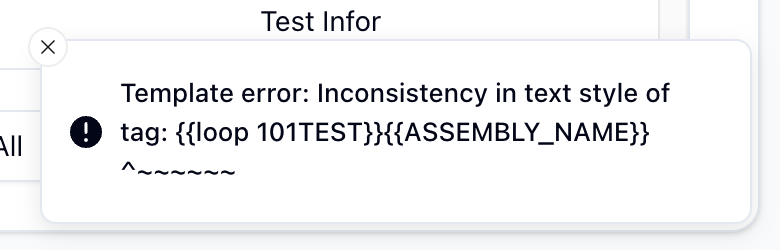
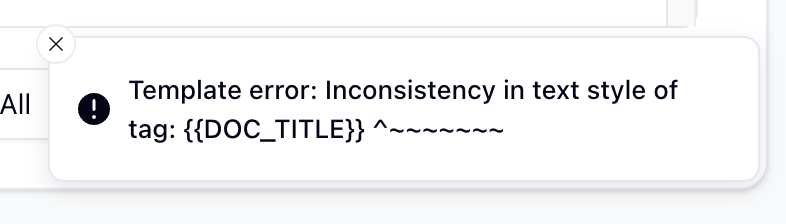
In the process of declaring a variable in the word editor and extracting it, if the text style in the variable is different, an error is returned as shown in the attached. Do I have to match the style? The same appears in the loop statement.


Please provide a link to a minimal sample where the issue is reproducible:

Hello, I’m AiRon, an automated tech support bot :robot:
While you wait for one of our customer support representatives, I can help you with your question.


It seems you’re encountering an issue with the getTemplateKeys function in the Word Editor of Apryse’s WebViewer, particularly when there’s a style mismatch in the variable text. This suggests that the function may be sensitive to text styling when extracting template keys.

Some things you can try:

  • Ensure that the text style of the variables you are trying to extract is consistent throughout your document. This might involve standardizing font type, size, and other styling attributes.

  • Check if the issue is reproducible with different documents or templates, which can help identify if it’s specific to certain styles or documents.

  • Try using the latest version of the WebViewer, as newer versions may offer improved handling of such issues.

  • Consider isolating the problem by creating a minimal example document with just the styled text and see if the issue persists.


Here are some resources that might help you:


Hopefully, this helps you solve your problem while you wait for a human to get back to you.

Hi Rlaks,

Thank you for reaching out.

To investigate the issue, please provide the minimal sample project and the sample file for us to reproduce the issue. Thank you.

You can find base samples here: Free Trial: JavaScript PDF Viewer | Apryse documentation

Best Regards,
Mickaël.

Thank you for your cooperation.

I am sending you the sample code and file as below.
sample_docx_file.docx (534.8 KB)

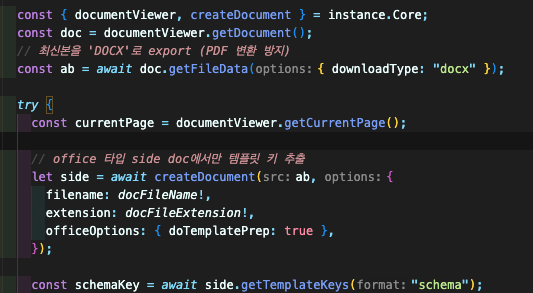
const handleFileVarStatus = async () => {
    if (!instance) {
      return {
        result: false,
        error: "Editor가 설정되지 않았습니다.",
      };
    }

    const { documentViewer, createDocument } = instance.Core;
    const doc = documentViewer.getDocument();
    // 최신본을 'DOCX'로 export (PDF 변환 방지)
    const ab = await doc.getFileData({ downloadType: "docx" });

    try {
      const currentPage = documentViewer.getCurrentPage();

      // office 타입 side doc에서만 템플릿 키 추출
      let side = await createDocument(ab, {
        filename: docFileName!,
        extension: docFileExtension!,
        officeOptions: { doTemplatePrep: true },
      });

      const schemaKey = await side.getTemplateKeys("schema");
      const keys = schemaKey?.keys ?? {};
      const list: string[] = [];
      for (const [k, v] of Object.entries(keys)) {
        if (
          v &&
          typeof v === "object" &&
          "itemSchema" in (v as any) &&
          (v as any).itemSchema
        ) {
          list.push(...Object.keys((v as any).itemSchema));
        }
        list.push(k);
      }

      setUsingVarList(Array.from(new Set(list)));
      setDocCurrentPage(currentPage);

      return {
        result: true,
        arrayBuffer: ab,
        keys,
      };
    } catch (err) {
      return {
        result: false,
        error: (err as Error).message,
      };
    } finally {
      await documentViewer.loadDocument(ab, {
        filename: docFileName!,
        extension: docFileExtension!,
        enableOfficeEditing: true,
        officeOptions: {
          // doTemplatePrep: true,
          formatOptions: {
            displayChangeTracking: false,
          },
        },
      });
    }
  };

Regards,

Hi Rlaks,

Thank you for providing the code snippet.

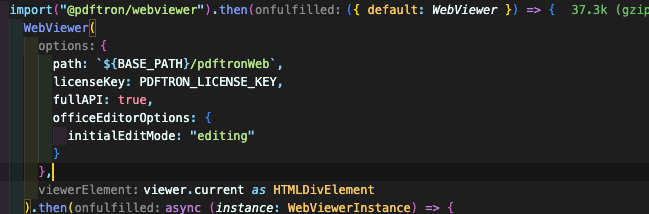
Can you also provide your Webviewer Constructor Options?

Have you tried upgrading to the latest version, 11.7.1 to see if that resolves your issue as well?

Best Regards,
Mickaël.

Thank you for your cooperation.

The version update is not yet in the plan.

I am sending you the Load Code as below.

  await documentViewer.loadDocument(docFileData, {
          filename: docFileName,
          extension: docFileExtension,
          enableOfficeEditing: true,
          officeOptions: {
            formatOptions: {
              displayChangeTracking: false,
            },
          },
        });

Regards,

Hi Rlaks,

Thank you for the loadind code this will be helpful as well but I was asking for the Webviewer Constructor options, something like this:

 WebViewer({
             path: '/webviewer/lib',
             initialDoc: '/files/demotest.pdf',
             fullAPI: true,
         },

         viewer.current
     ).then((instance) => {

Best Regards,
Mickaël.

Thank you for your cooperation.

Set the option to true when you already initially create an instance.

Can you reproduce it with the sample docx file I sent you?

Regards,

Hi Rlaks,

Thank you for providing all the needed informations.

After a few tests, I can confirm the issue when trying to use the office template fill feature while in the Office Editor. This feature is meant to be used when opening the office file as a PDF using the PDF viewer, not the Office Editor.

As you can see on the Showcase:

We are using the PDF Viewer for this feature.

I was also able to find some issues with your template file. Those issues were generated after loading the file and using this sample code, which is working on our two sample templates:
letter_template.docx.pdf (31.2 KB)
tg_demo_columns_reflow.docx (14.0 KB)

let doc = documentViewer.getDocument();
const schemaKey = await doc.getTemplateKeys('schema');
{
    "docId": 8,
    "message": "Template error: Inconsistency in text style of tag:\n\t{{loop test}}{{a}}\n\t       ^~~~",
    "type": "error"
}

{
    "docId": 8,
    "message": "Template error: Unmatched tag right-delimiter:\n\ttest}}{{a}}\n\t    ^~",
    "type": "error"
}

The template does not respect all the conditions. I invite you to read this guide:

Best Regards,
Mickaël.

Thank you for your cooperation.

think the reason why this error occurred was because the text style in that tag did not match when using {{loop test}} {{a}} {{endloop}} in the word file. In fact, I intentionally put a bind style in the test text.
Regards,

Hi Rlaks,

Thank you for your reply.

I understand more about the issue you were trying to report.

Can you clarify what you mean by "put a bind style’ and what you mean by “not matching the word file”, matching when compared to what exactly?

Once I have that information, I will raise it internally and get back to you with updates.

Best Regards,
Mickaël.